Updates and lobby chat
Under the description sit two tabs. They look similar and do opposite jobs: Updates is you talking to the field, Lobby chat is the field talking to itself. A third tab, Tables, joins them once you have seated the field — see The seating chart.
Updates
An update is an announcement: the room changed, the start moved, food is being ordered. Newest first, each with a title, a timestamp and formatted text.
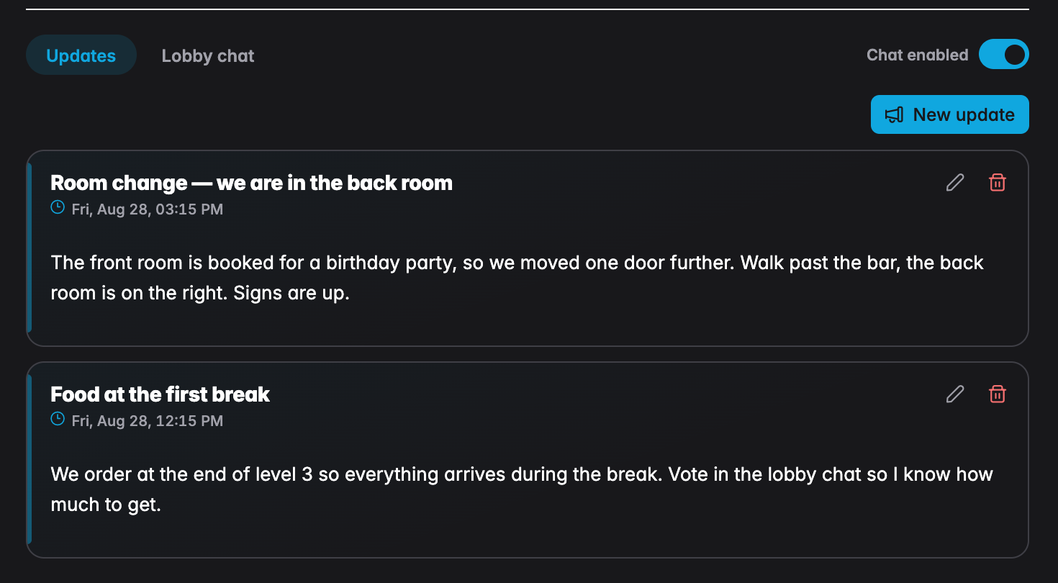
Everyone who can open the lobby can read the updates, including visitors who have not registered. Players see a NEW badge on anything posted since they last had the page open, and a count on the tab itself.
Posting one
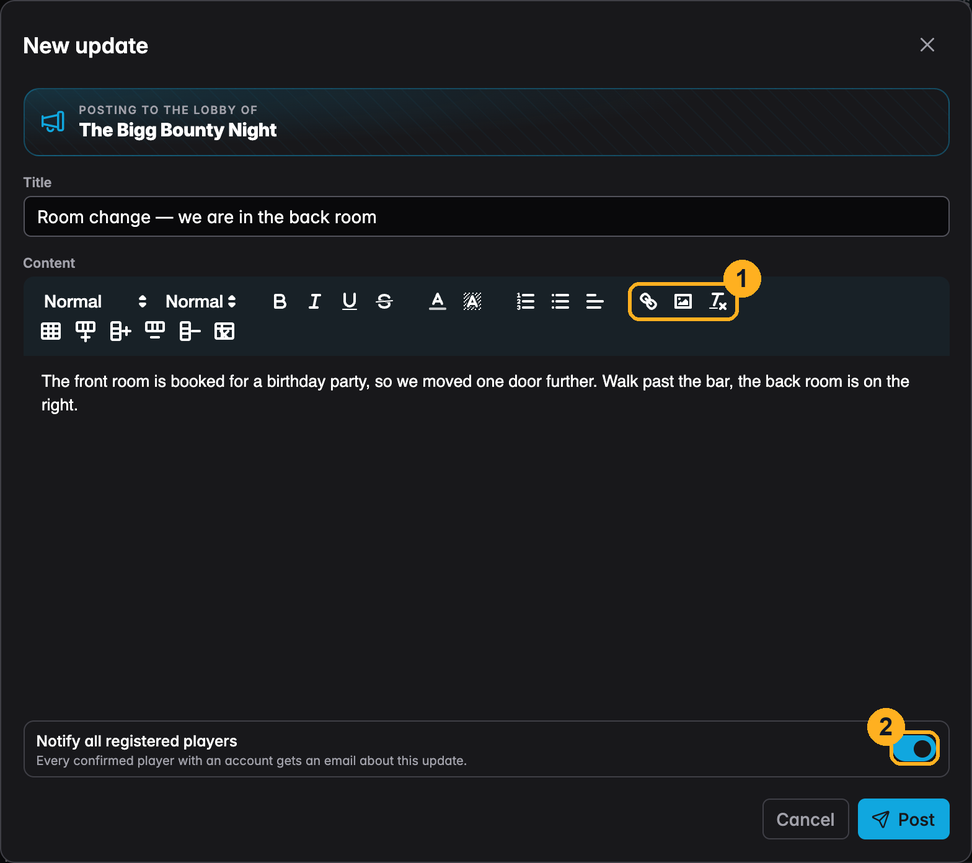
1 — The editor takes links and images. An image can be dropped straight onto the text area or pasted from the clipboard; UHT converts it to WebP and embeds it, so a photo of the venue or a hand-drawn map costs the page very little.
2 — Notify all registered players sends an email with the update to every confirmed player who has an account. It is on by default, which is right for a room change and wrong for a third message in ten minutes. Turn it off when the update is not worth a phone buzzing in someone's pocket.
Updates can be edited and deleted afterwards; the pencil and bin appear on each one for the host. An edited update is marked as such. Editing never re-sends the email.
Lobby chat
The chat is for the players. It is visible to you and the confirmed players only — pending registrations and visitors do not see the tab at all. That is deliberate: the people in the conversation are the people who will be at the table.
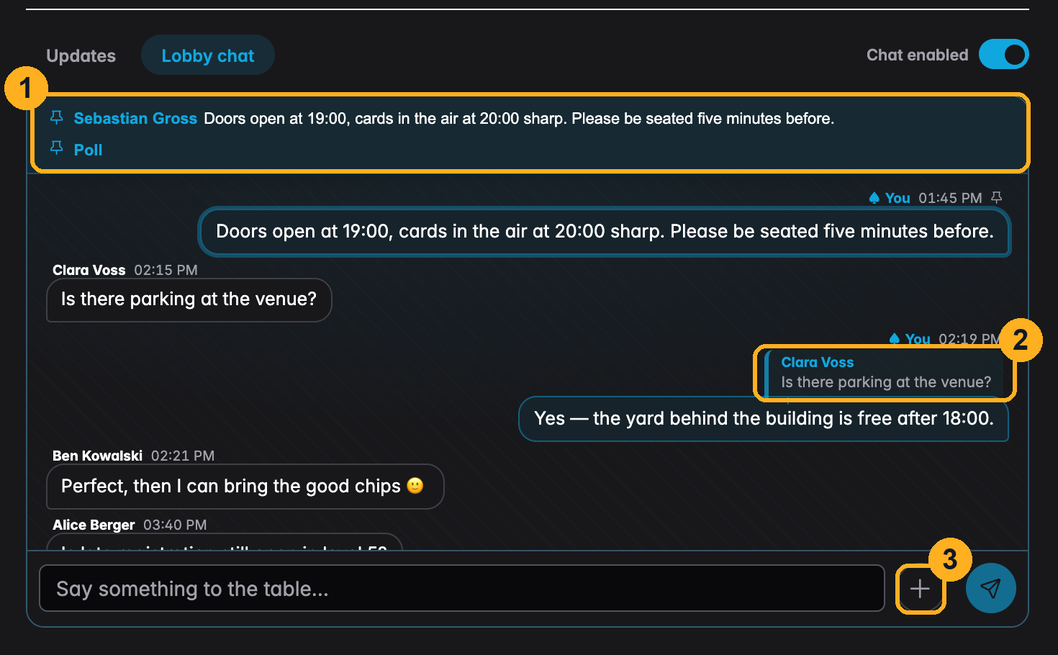
1 — Pinned messages. Anything you pin sits in a strip at the top of the transcript, above the scroll. Clicking an entry jumps to the message in the flow. This is where the one line everybody needs — "doors 19:00, cards 20:00" — belongs, so nobody has to scroll for it.
2 — Replies. Hovering someone else's message reveals a reply button; the composer then shows what you are answering, and the sent message carries the quote above it. Clicking a quote jumps back to the original.
3 — The + menu next to Send. Host only, and currently home to polls.
Everything else is what you would expect: typed smileys like :-) are turned into emoji
when the message is sent, consecutive messages from the same person within a minute are
grouped under one name, and a divider marks where the reader stopped last time.
Moderating
- Chat enabled, the switch in the tab row, pauses the chat for everyone. Earlier messages stay readable; the composer is replaced by a short note.
- Mute sits in the cog menu on a player's message. A muted player reads along but cannot post; they are told they are muted rather than left wondering why nothing sends.
- Delete removes a message. You can delete any message; players can delete their own.
The chat on its own page
Most people open the lobby for one reason — to see what has been said since they last looked — and they do it on a phone. The chat therefore also exists as a page of its own, with nothing else on it:
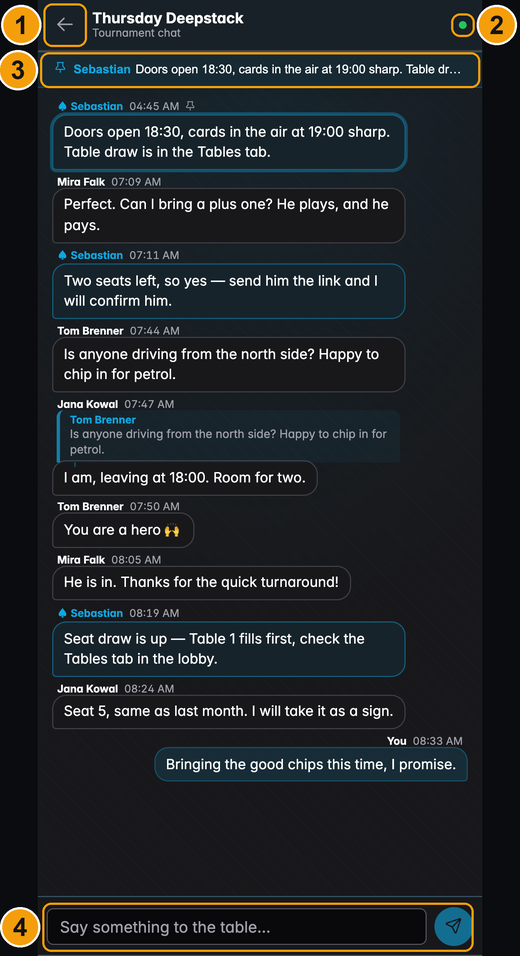
1 — Back to the lobby. The full lobby page, one tap away.
2 — The connection dot: green while the page is live, red while it is reconnecting. Messages arrive on their own as long as it is green.
3 — The pinned strip, the same one the tab has.
4 — The composer. On a phone it stays pinned directly above the on-screen keyboard rather than disappearing behind it — the page is sized to the visible part of the screen, which is what makes it usable one-handed while you are still on your way to the game.
Everything the tab can do, this page can do: replies, pinning, polls, and — for the host — muting and deleting. The header and footer of the app are hidden, so on a phone the transcript gets the whole screen.
Opening it
Chat on the planned tournaments list opens it in a new browser tab, both on your own lobby tournament and on any tournament you are registered for. It is meant to be left open there for the evening — that is why it is a new tab and not a navigation.
It has its own address, built from the lobby's share id, so it can be bookmarked or sent on:
https://ultimate-holdem-timer.com/lobby/lAb3Xz/chat
When it will not open
The page has the same audience as the chat tab, and says which of the four reasons applies:
| What you see | Why |
|---|---|
| Sign in to read the chat | Nobody is signed in on this device |
| You are not registered | Signed in, but not registered for this tournament |
| Waiting for the host | Registered and still Pending |
| You're on the waiting list | On the waiting list, not in the field |
| This lobby is closed | The tournament has started, or the lobby was closed |
The first four all offer a way on — sign in, or open the lobby and register. And you do not have to reload once you are let in: a player sitting on Waiting for the host drops straight into the chat the moment you confirm them.
Polls
A poll is a chat message with options attached — the fastest way to settle food, start time or structure without counting replies by hand.
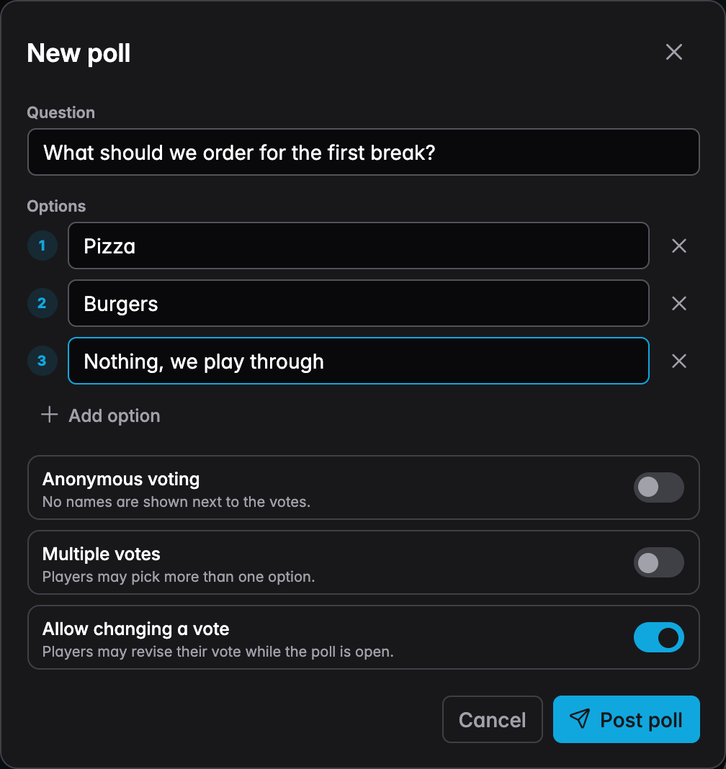
Between two and twelve options, and three switches:
| Switch | Effect |
|---|---|
| Anonymous voting | Results show counts only — no avatars, no names |
| Multiple votes | Players may pick more than one option |
| Allow changing a vote | Players may revise while the poll is open |
The poll appears in the transcript and behaves like any other message — it can be pinned, replied to and deleted.
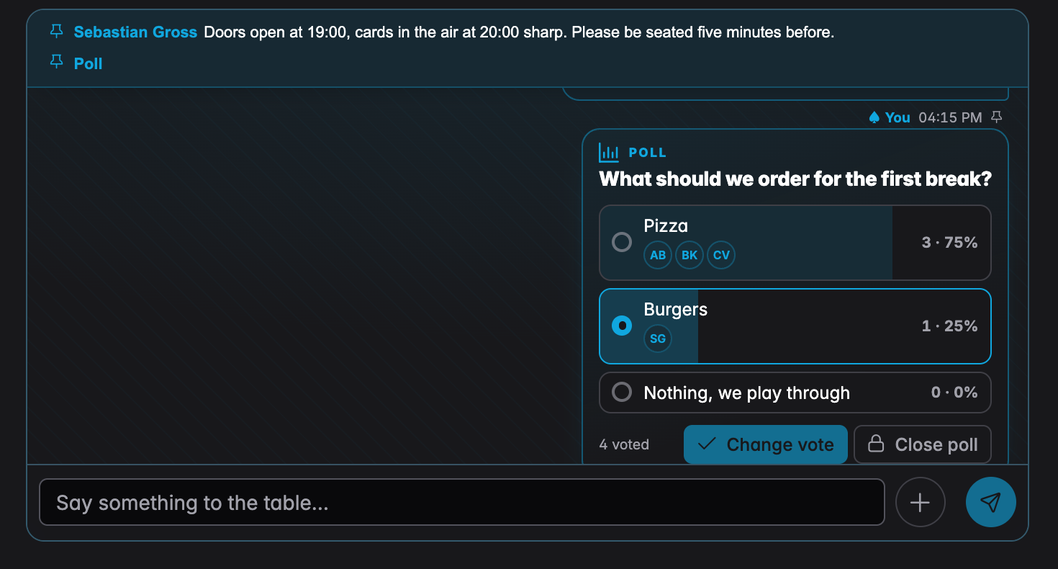
Results appear once the reader has voted, or once the poll is closed; the host sees them from the start. Voters are shown as small avatars unless the poll is anonymous. Close poll freezes the result and stops further voting — the question stays in the transcript with its final numbers.
A poll posted an hour before the game is halfway up the transcript by the time people read it. Pinning it keeps it at the top until you close it.
Which one to use
| Updates | Lobby chat | |
|---|---|---|
| Audience | Everyone with the link | Host and confirmed players |
| Direction | You → the field | Everyone ↔ everyone |
| Optional, per update | Never | |
| Formatting | Rich text and images | Plain text, emoji, polls |
| Good for | Room change, structure change, the plan | Questions, banter, deciding on food |
An update that matters — a new address, a start moved by an hour — belongs in Updates, with the notification on. Everything else belongs in the chat, where it does not put mail in anyone's inbox.
Next
- Managing registrations — the rest of the host's controls
- The lobby page — what the field sees