The tournament lobby
Organising a home game usually happens twice: once in a chat group, and once again in UHT. You post the date somewhere, collect replies, chase the two people who never answer, and then type the whole field into the timer by hand.
A lobby replaces the first half of that. It is a public page for one planned tournament, reachable by a short link:
https://ultimate-holdem-timer.com/lAb3Xz
Anyone who has the link sees the event — start time, venue, blind structure, buy-in, prize distribution and who has signed up. Anyone with a UHT account can register themselves. You approve or decline, and the confirmed players land in the tournament directly, no retyping.
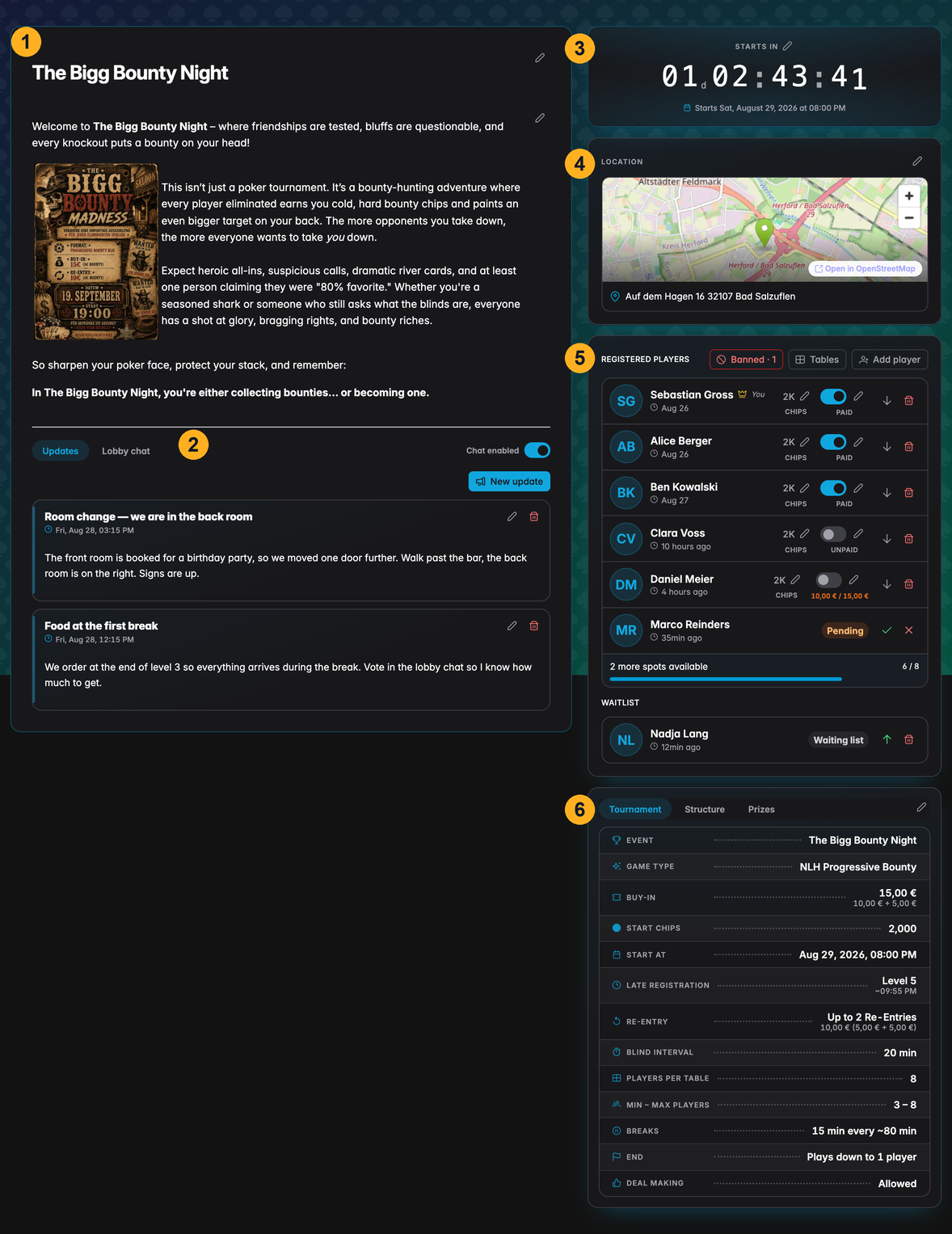
| # | On the page |
|---|---|
| 1 | Tournament name and description — free rich text, images included |
| 2 | Updates, lobby chat and — once the field is seated — the seating charts |
| 3 | Countdown to the start, and the Register button for visitors |
| 4 | Venue, with a map when the address can be resolved |
| 5 | Registered players, the waiting list, and every host action on them |
| 6 | Tournament facts, blind structure and prize distribution |
What you need
-
A UHT account. Lobbies live on the server, so anonymous local-only tournaments cannot have one. Players who want to register need an account too — that is what stops the list filling up with made-up names.
-
A free multi-monitor slot. Opening a lobby switches multi monitoring on for that tournament, because both features rely on the same server-side copy of it. Your licence tier decides how many tournaments may use it at the same time; if that limit is reached, UHT says so and points at the tournament that is holding the slot.
-
Player tracking. A lobby registers people as individual players, so the tournament has to track them. UHT switches Track Players on when the lobby is created and locks it there for as long as the lobby is open.
Multi monitoring and the lobby are switched off together. Disable Multi Monitor & Lobby on the tournament closes both in one step — see Closing a lobby. Starting the tournament releases them too.
How long a lobby lives
A lobby exists for exactly as long as its tournament is planned:
- You create it from the start dialog of a planned tournament.
- Players register; you manage the field; everyone follows the updates.
- The tournament starts — the lobby is deleted, and the link shows a short "this lobby is closed" page.
Deleting the tournament removes the lobby as well. There is no archive: the lobby is a staging area for an event that has not happened yet, not a record of one that has. What survives is the tournament itself, with the confirmed players already registered in it, and afterwards the player results.
A lobby is a good match for a scheduled tournament with Auto-start on: the countdown on the lobby page and the actual start are the same moment, so nobody has to be told when to turn up at the table.
Who sees what
The same page renders three ways, depending on who opens the link.
| Viewer | Sees | Can do |
|---|---|---|
| Visitor — no account, or an account that has not registered | Everything except the chat and the seating charts | Register (needs an account) |
| Registered player — pending, confirmed or waiting list | Everything; the chat and the seating charts once confirmed | Register / unregister, chat, vote in polls |
| Host — the account that owns the tournament | Everything, plus payment and chip columns | Every action on the page |
Email addresses, account ids and the raw tournament data are never part of the public page. A visitor sees names and states, nothing else.
Next
- Opening a lobby — creating one and sharing the link
- The lobby page — what players see, how they register, and the seating charts
- Managing registrations — approving, seating and removing players
- Updates and lobby chat — announcements, chat and polls