Leagues and leaderboards
A league turns a string of separate tournaments into one season. Every tournament you assign to the league hands out points, UHT adds them up, and everybody can see who is on top, who is catching up and who won the most nights.
At Harbor Lights Poker Club the Autumn League 2026 runs from August to December: every Friday Deepstack counts, the players collect "Harbor Points", and the best three at the end win seats in the Main Event. That league is the example on this page.
This page covers setting a league up and looking after its players. The other league pages go further:
- League scoring explains how points are calculated and how to write your own formula.
- League tournaments shows how tournaments get into a league and how to correct points.
- League statistics explains the leaderboard, the chart and every record.
- Importing a league brings a season you started on paper into UHT.
Where leagues live
Open your club and switch to the Leagues tab.
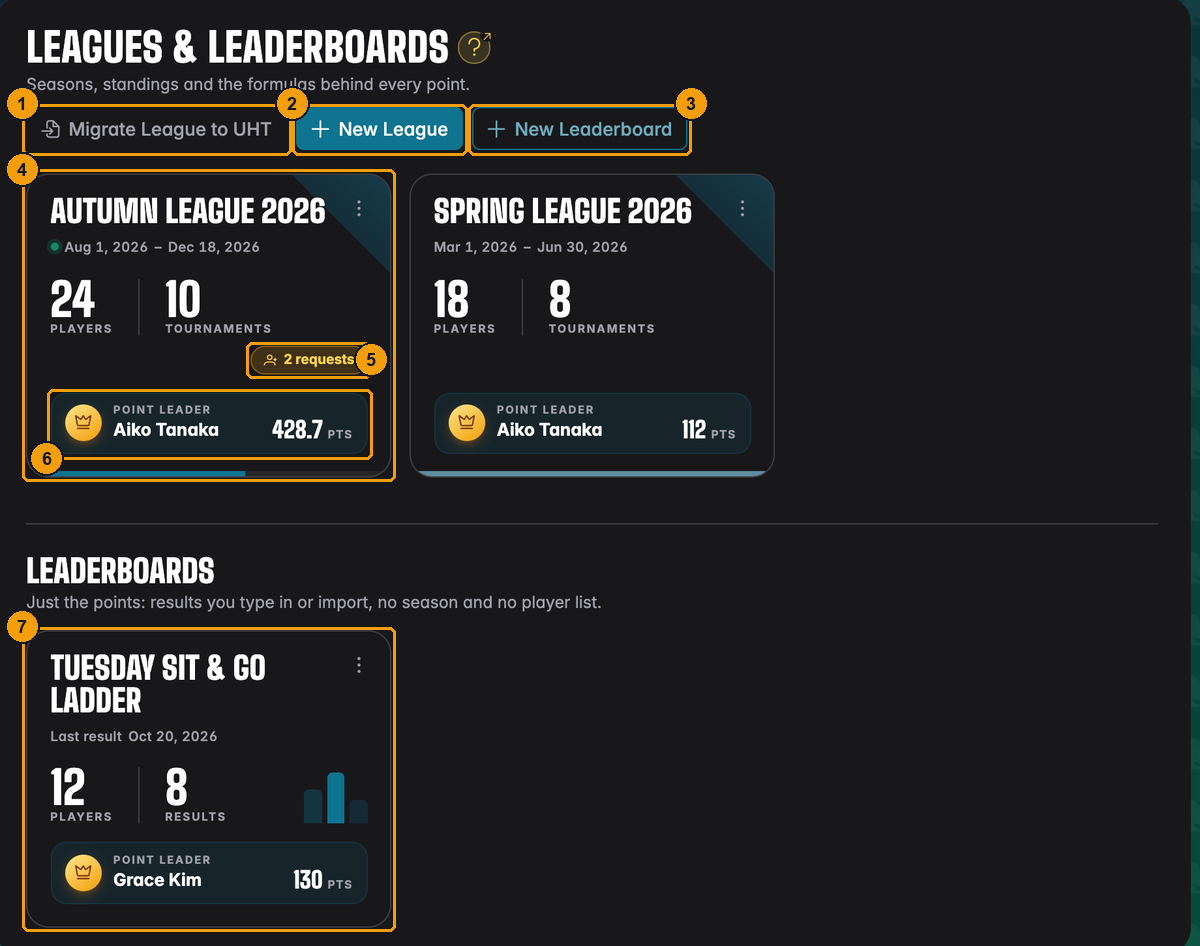
- Migrate League to UHT imports a league you ran somewhere else. See Importing a league.
- New League starts a season.
- New Leaderboard starts a points table without a season (more on that below).
- A league card: name, runtime, number of players and tournaments.
- Open join requests. Only directors see this badge.
- The current point leader.
- Leaderboards get their own section under the leagues.
The Leagues tab itself carries a small bubble with the number of open league requests, so you notice them from any part of the club page.
League or leaderboard?
UHT has two kinds of points table. Pick the one that matches how your club plays.
| League | Leaderboard | |
|---|---|---|
| Players | A fixed list of club members who joined the league | Anyone whose name you type in, guests included |
| Runtime | A start and an end date | None, it just keeps going |
| Results | Come in automatically from the tournaments assigned to the league | You type them in or copy them from a finished tournament |
| Statistics | Chart and league records | Chart and a list of results |
| Good for | A proper season with a prize at the end | Home games, cash nights, Sit & Gos, a quick ladder |
The Tuesday Sit & Go Ladder at Harbor Lights is a leaderboard. Nobody signs up for it. After each Sit & Go the director types in who finished where, and the table updates. Guests like "Tom (guest)" appear in it without needing an account.
The dialog for a new leaderboard shows the same comparison, so you can still change your mind.
Creating a league
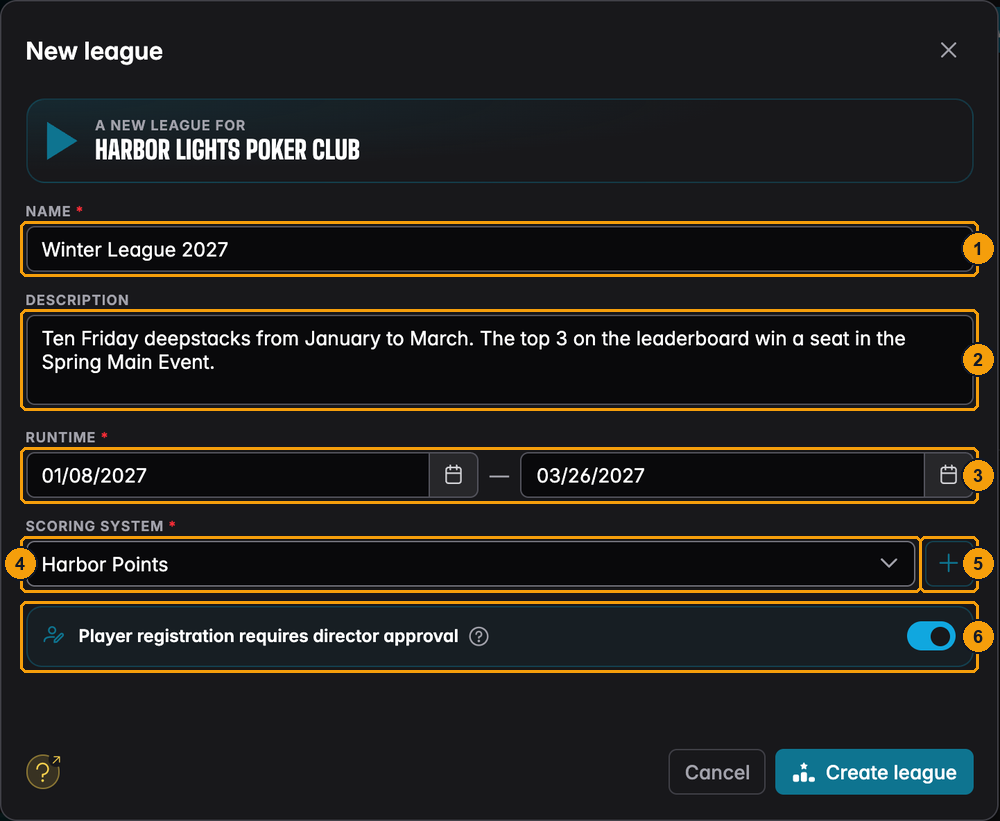
Click New League and fill in the dialog.
-
Name, for example "Winter League 2027". Players see it on cards, the display and in their statistics, so keep it short.
-
Description (optional). Prizes, the number of tournaments, special rules. Members read it at the top of the league page.
-
Runtime: the first and the last day of the season. Both days count. Tournaments outside this window cannot be added to the league.
-
Scoring system: the formula that turns a finish into points. Pick one from the list.
-
The + next to it creates a new scoring system on the spot, and the pencil beside the + edits the system you picked. The pencil and bin next to each entry in the list edit or delete one (see League scoring). Only directors see these buttons.
-
Player registration requires director approval. Turn it on and every member who wants to join has to wait for a director to say yes. Leave it off and members join with one click.
-
Only league members (and staff) can see the league. Turn it on for a closed league, see Members-only leagues. The help button next to it explains the switch.
-
Advanced settings opens a small dialog with extra rules: Only count the best results and the High hand side bet, both described below. A line under the button tells you which rules are on, for example "Best 6 results count".
Press Create league. The league is empty at first: no players, no tournaments. You fill it in the next two steps.
Only count the best results
Long seasons punish people who miss a night. With Only count the best results a player's total is made of their best results only. Open Advanced settings, tick the box and enter the number of results that count.
Example: the Autumn League has 18 tournaments and you set the number to 6. Everybody is ranked by their 6 best nights, so a player who could only come to 8 games is not behind a player who came to all 18. A player with fewer than 6 results simply counts all of them.
- In the table a small "best 6 of 18" shows under the total. The points of a dropped night are struck through on the league's Tournaments tab ("Your points"), in that night's final standings and in the tournament report.
- Point adjustments for the season always count. A bonus or penalty you gave a player is never dropped.
- If two results are worth the same, the earlier night is the one that counts.
- Statistics are not affected: games played, wins, the in-the-money rate and the other records still include every game.
- You can change or remove the rule at any time, also in the middle of the season. UHT calculates the whole season again, so the table changes right away.
Leaderboards do not have this setting.
High hand side bet
The high hand is a side bet: the best five-card hand of the evening wins an extra prize that does not come from the prize pool. Any tournament with a lobby can have one, see Side bets: the high hand. The league setting makes it part of the season.
Open Advanced settings and switch on High hand under Side bets. Then:
- When you schedule a tournament for the league or put one into it, the high hand is switched on with the buy-in as the prize. You can change the prize or turn it off for that night (see With a league).
- A chip on the league page, Highest hand of the season, opens the season's ten best hands with the player and the tournament. Hands that are equal share a rank.
- The league's Tournaments tab shows each game's best hand.
Switching High hand off hides the side bet on the league pages. The tournaments keep their prize and still show and pay it, so switching it on again brings everything back. A tournament of a league without the high hand can still have its own: it then counts for that night only, not for the season.
A club can run several leagues at once, for example a Friday league and a Sunday Bounty league. The same tournament can only count for one league, though.
The league page
Click a league card to open it.
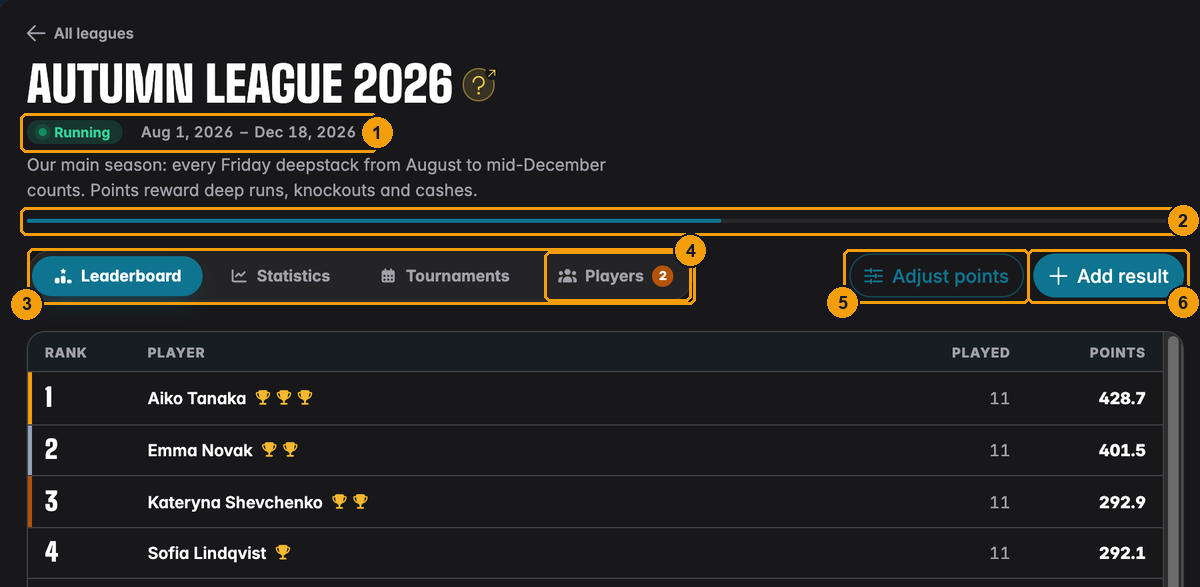
- Status and runtime. Running while the season is on, Upcoming before the first day, Finished after the last.
- The thin bar shows how much of the season has passed.
- The views: Leaderboard, Statistics and Tournaments. Every league player sees them.
- Players is only there for directors and league admins. The bubble counts open join requests.
- Adjust points gives or takes points by hand. See Point adjustments.
- Add result enters a game that was played without the timer, for example at someone's kitchen table. See Adding a game by hand.
Who plays in the league
Only club members can play in a league, and only the players on the league's list score points. A guest or a club member who is not on the list can still play in a league tournament, they just do not collect points.
There are two ways onto the list:
- A director adds the player. This is quickest when you start a season and already know who is in.
- The player asks to join. Every member sees all of the club's leagues on the Leagues tab and can request a place. What the player sees is described on Joining clubs and leagues.
The Players tab
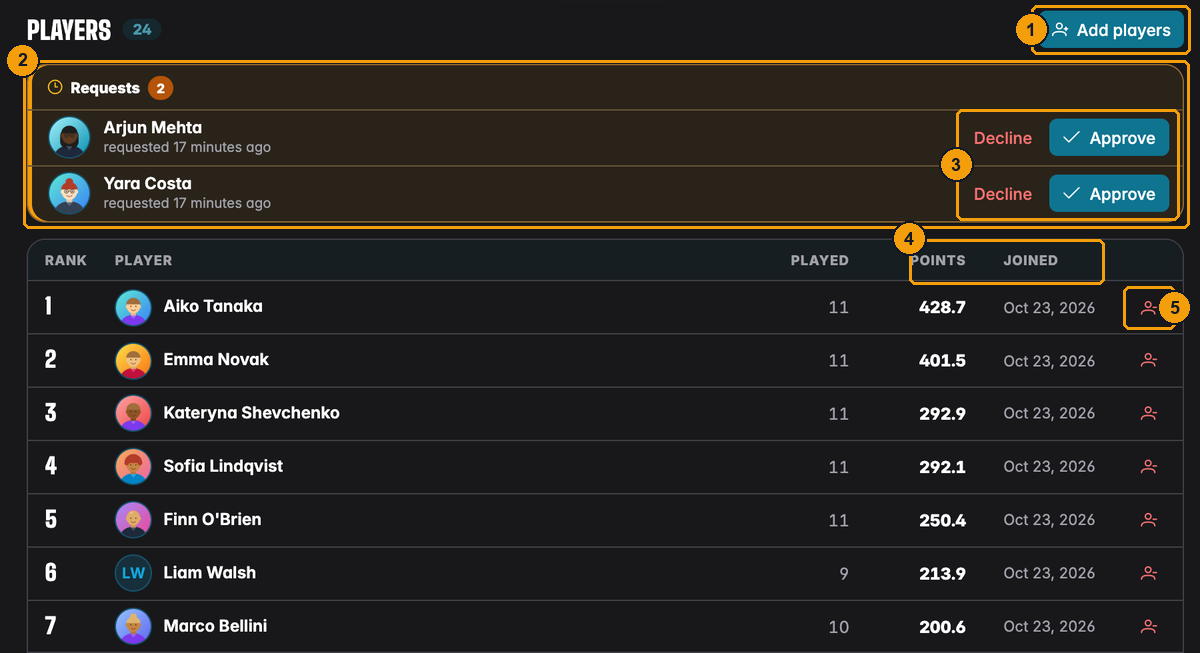
- Add players opens the list of club members who are not in the league yet.
- Requests come first, the oldest at the top. Arjun and Yara asked to join the Autumn League.
- Approve lets the player in, Decline turns the request down. Either way the player gets an email.
- Below the requests is the player list with each player's current rank, points and the date they joined.
- The person icon at the end of a row removes the player from the league.
Above the player list, a search field finds players by any of their names, and the buttons next to it show only players who have Played, those who have Not played yet, or – when the league has some – the Manual players (marked with the yellow M). Click a player's row to open their details, the same view as on the club's Members tab. Directors also set the player's role in the league there. A player who is a league admin wears a small crown next to their name.
Adding players yourself
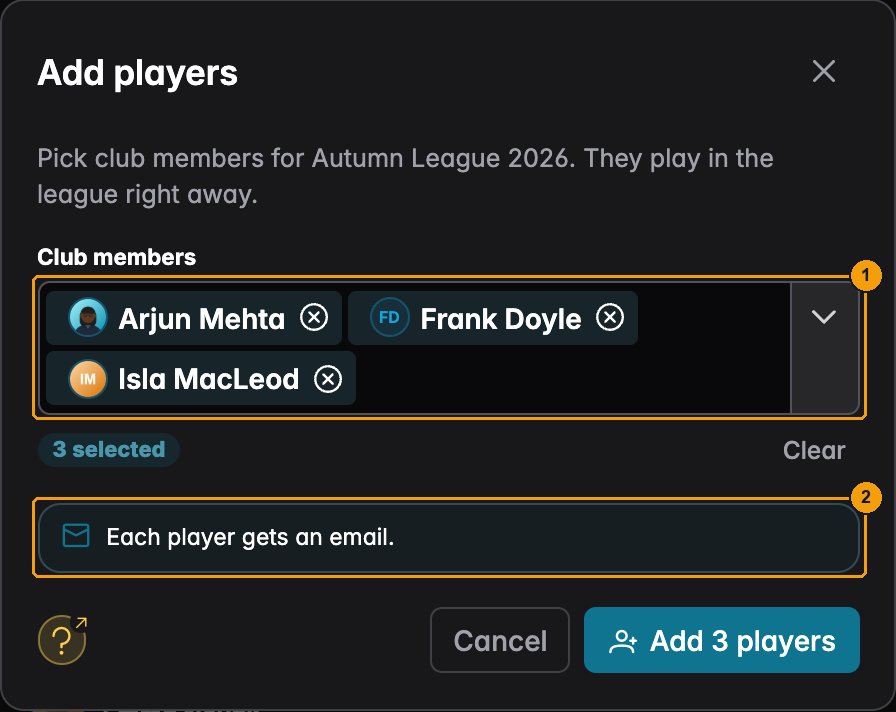
- Pick as many members as you like. Members who already asked to join are marked Asked to join; adding them approves their request at the same time.
- Each added player gets an email that they are now in the league.
Manual players, the club members without an account, can be added the same way. They get no email, of course.
Removing a player
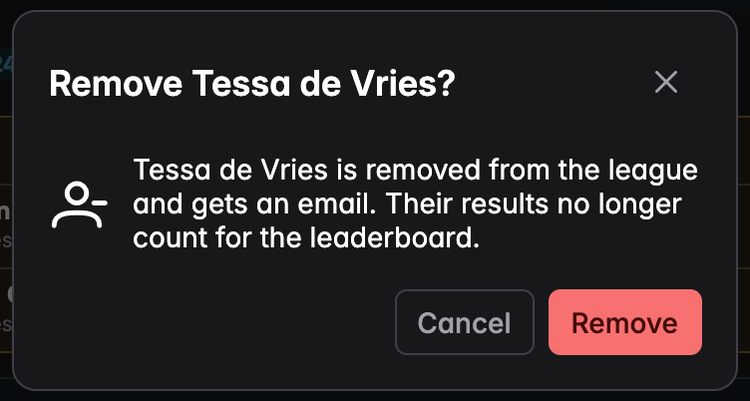
Removing a player takes them off the leaderboard straight away, and their past results stop counting. Nothing is deleted, though: if you add the same player again later, all their points come back.
The same happens when a member leaves the club or is removed from it: they drop out of every league of that club.
Some formulas look at how many league players took part in a tournament or how many of them a player knocked out. If you remove a player, those counts change for the tournaments they played, and so can the points of others. With a plain formula like "players minus place" nothing changes for anyone else.
Open or by approval
The Player registration requires director approval switch decides what happens when a member clicks the league card:
- Off: the card says Join, and the member is in the league right away. Fine for an open club league where anyone can play.
- On: the card says Request. The member waits until a director approves. Use this when a league has a fee, limited places, or you want to check who plays.
Turning approval off later does not approve open requests. They wait for you on the Players tab. Directors never need approval for themselves.
League admins
A director can hand a league to a trusted player. A league admin runs that one league without being a director of the club.
Making someone an admin
- Open the league and switch to Players.
- Click the player's row. The player details open.
- Under Role in the club you find Role in the League. Choose Admin (or Player to take the role away again).
Only directors do this, and only for players who are on the league (not for requests that are still open). Manual players cannot be admins because they cannot sign in. The role belongs to the place on the league's list: if the player is removed from the league or leaves the club, the role is gone.
An admin gets a crown next to their name in the players list. Hover the crown to see what it means. A member who is also a director or floor staff keeps those club rights. The league role only adds to them.
What an admin can do
For their league, and only for that league, an admin can:
- edit the league in the league dialog (name, runtime, scoring system, approval, members-only, hidden statistics). They can pick one of the club's scoring systems, but not create, edit or delete one;
- add players, approve or decline join requests, and remove plain players;
- add and delete games entered by hand (a hand-entered game cannot be edited as a whole: its title, date and players stay fixed), and take finished tournaments out of the league;
- change the points of a game, its high hands, the scoring system of a single game, and adjust season points;
- schedule tournaments for the league with Schedule tournament on the league page (a league is required, see League tournaments).
Join requests are mailed to the directors and to the league's admins, and the same goes for the push message.
What an admin cannot do
- Create, delete or import leagues.
- Create, edit or delete scoring systems.
- Remove another admin, or themselves: only a director removes an admin from the league. Admins also cannot hand out roles.
- Touch leaderboards, the club's financials or the club settings.
- Delete a finished tournament from the club's history.
Members-only leagues
Switch on Only league members (and staff) can see the league in the league dialog, next to the approval switch. It is off by default.
A members-only league and its tournaments are hidden from every club member who is not on the league's list. They do not see the league card, and its tournaments are missing from the calendar, the upcoming and finished lists and the standings. This holds even when the club setting All club members see all club tournaments is on. Directors and floor staff still see everything. Someone with an open join request keeps seeing their request.
Because nobody outside can find the league, they cannot ask to join it either. A members-only league is invite-only: directors and admins add the players. The league page itself still opens only for directors and the league's players, as for every league.
Pushing the "registration is open" message follows the same rule: only those who can see the tournament get it. That also means that for normal league tournaments the push goes only to the league's players (and staff) while All club members see all club tournaments is off.
The public lobby page of a tournament, opened with its link, stays public.
What members see
Members see every league of the club on the Leagues tab, even the ones they do not play in. The standings, statistics and tournaments of a league are only open to its players and to the club's directors.
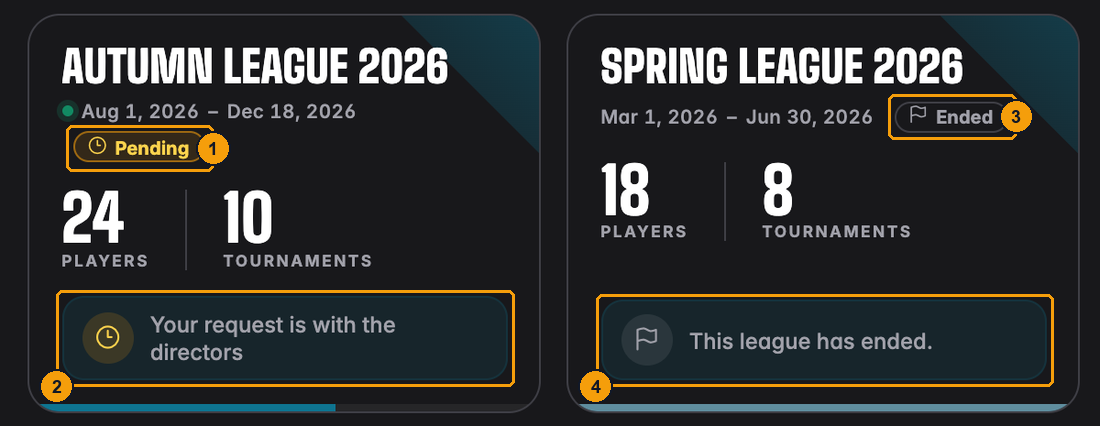
- Arjun has asked to join the Autumn League, so its card shows Pending.
- Instead of the point leader he sees that his request is with the directors.
- The Spring League is over, so it shows Ended.
- Nobody can join a league that has ended.
Floor staff are treated like members here: they see the leagues they play in. Only directors see every league in full.
Leaderboards
A leaderboard is created with New Leaderboard. It needs only a name, a description and a scoring system.
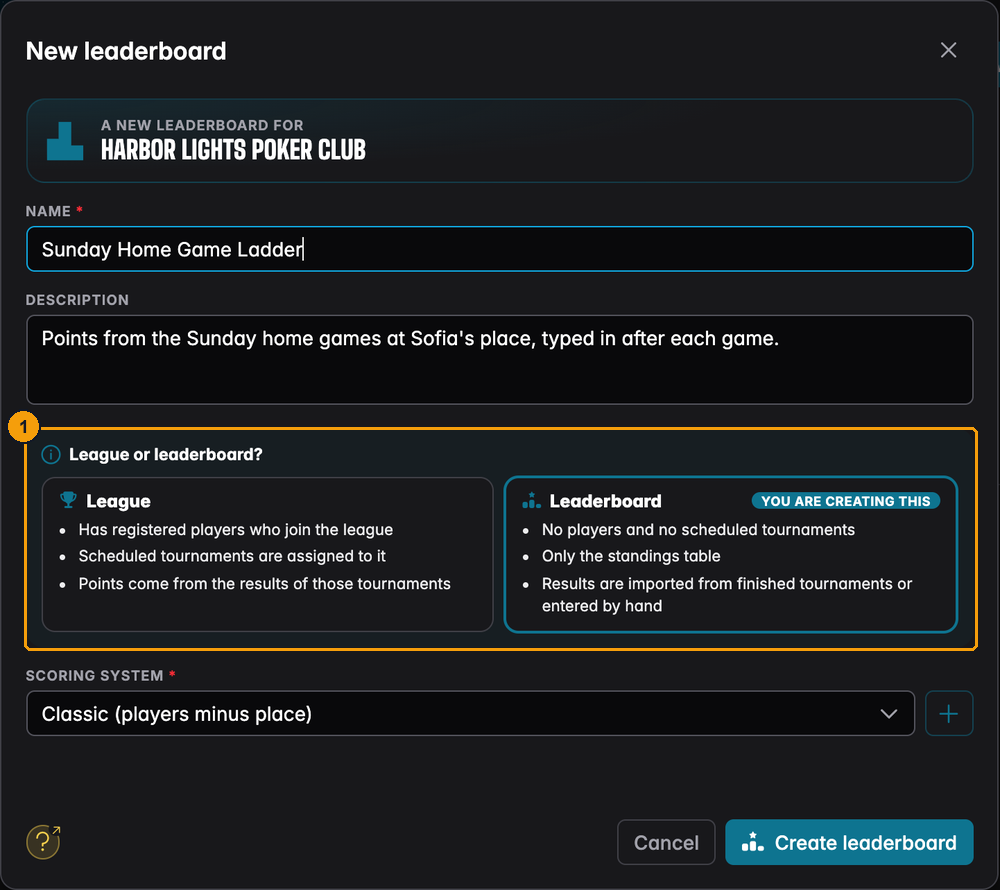
- The comparison between league and leaderboard, with the one you are creating marked.
There is no runtime and no player list. Every club member can open every leaderboard.
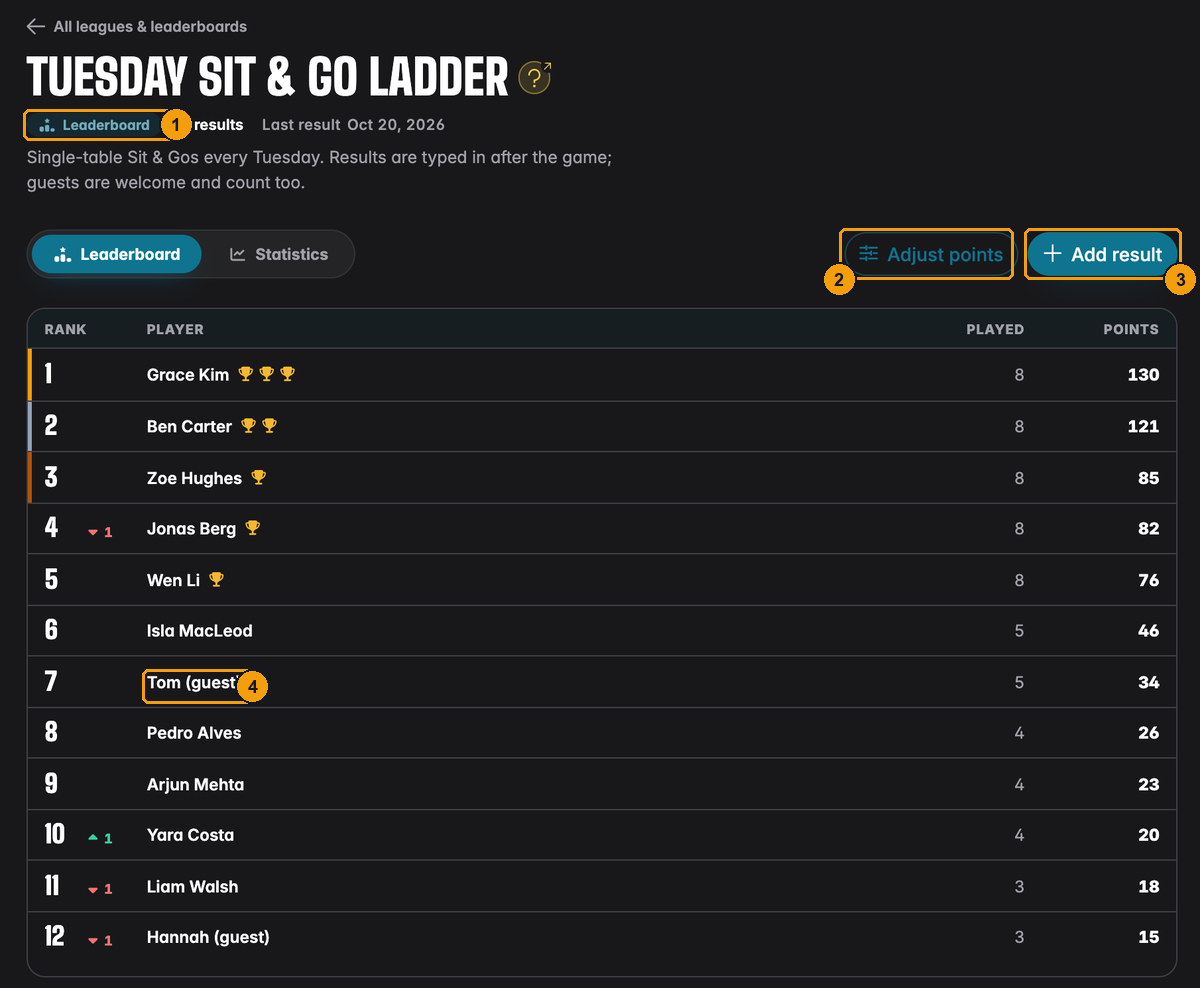
- The Leaderboard tag tells members this is a results table, not a league.
- Adjust points works as in a league.
- Add result is how results get in.
- Guests appear under the name you typed. "Tom (guest)" is a different player from "Tom Miller", so spell names the same way every time. UHT suggests known names as you type.
Add result offers two ways:
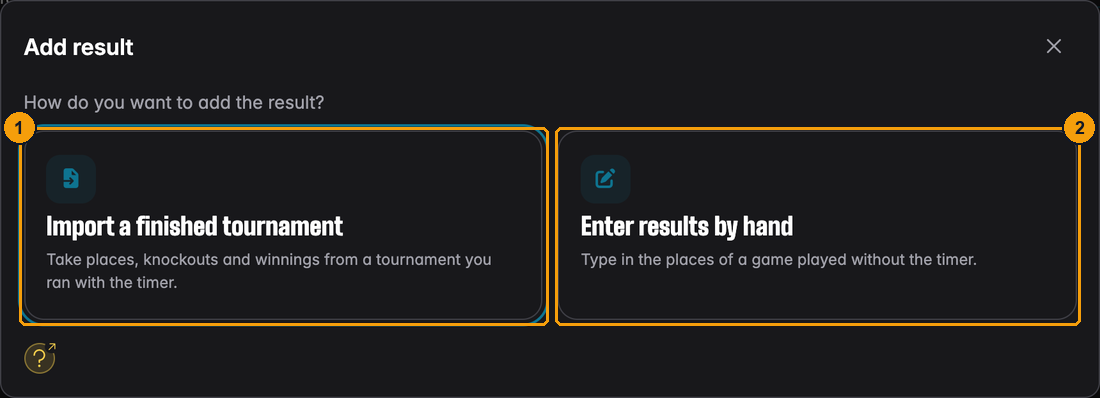
- Import a finished tournament copies places, knockouts and winnings from a tournament you ran with the timer. Each tournament can only be imported once per leaderboard.
- Enter results by hand gives you an empty score sheet for a game played without the timer.
Both are shown step by step on League tournaments. A result cannot be edited afterwards: delete it under the chart on the Statistics tab and enter it again.
Editing, ending and deleting a league
The three dots on a league card open the league menu.
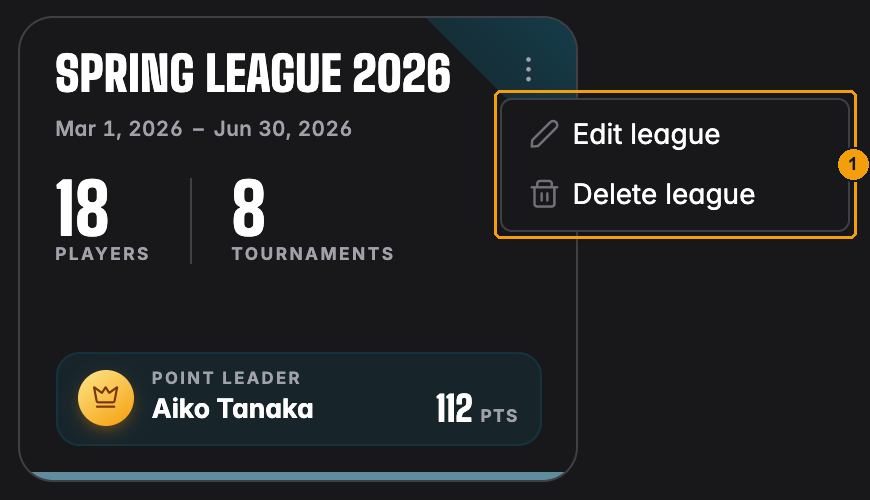
- Edit league opens the same dialog as when you created it. You can change the name, description, runtime, scoring system, the approval switch and the members-only switch at any time. Directors and league admins can also open it with the pencil icon at the top of the league page (tooltip Edit league). Delete league removes it.
When the season ends
There is no button to close a season. A league ends after the last day of its runtime:
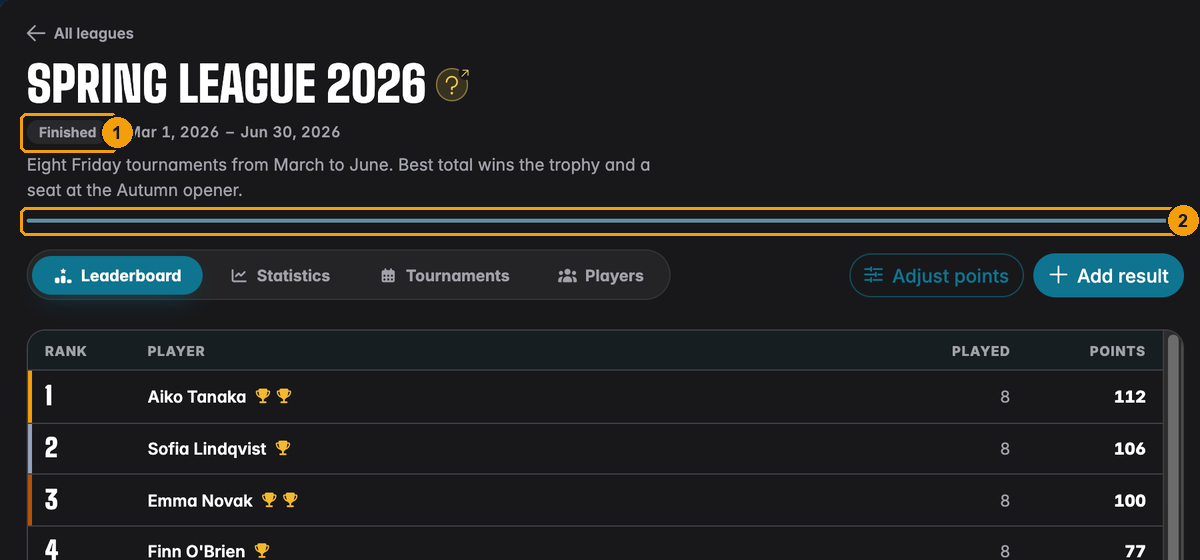
- The status changes to Finished.
- The progress bar is full.
From then on nobody can join, but everything stays: the final table, the statistics, every tournament. Players keep seeing the league and their points in it.
A few things to know:
- If the last tournament runs late, or you want to add a make-up game, move the end date with Edit league.
- The standings are calculated fresh every time someone opens the league. If you change the scoring system after the season ended, the final table changes too. Create a new scoring system for the next season instead of editing the old one.
- To start the next season, create a new league. Players have to join again (or you add them), which is also a good moment to clean up the list.
Deleting a league
Delete league removes the league, its player list and all point adjustments. The tournaments themselves stay: they remain in the club's finished tournaments, they just no longer count for any league. This cannot be undone.
Deleting a leaderboard deletes all its results as well.