League statistics
Points are only half the fun. Players want to know who climbed three places last Friday, who has the most knockouts and whether their average finish is better than their rival's. This page goes through every number UHT shows for a league, explains how it is worked out, and who gets to see it.
The examples come from the Autumn League 2026 and the finished Spring League 2026 at Harbor Lights Poker Club.
Who sees what
| League players | Directors | Other club members | |
|---|---|---|---|
| League card with the point leader | yes | yes | the card only |
| Leaderboard, Statistics, Tournaments | yes | yes | no, they see a "join" message |
| Players tab, join requests | no | yes | no |
| League records hidden by the directors | no | yes, marked as hidden | no |
| Point adjustments and their reasons | only the new total | yes | no |
| Points in the final standings of a league tournament | yes, for tournaments they played | yes | only for tournaments on their finished list, see Who sees which tournament |
| A member's results across the club | their own, in My Results | every member's (floor staff too) | no |
Floor staff count as members here, with one exception: like directors, they can look up a member's results. A leaderboard (the results-only kind) is open to every club member.
The leaderboard
The Leaderboard view is the league table. It is what everybody opens first.
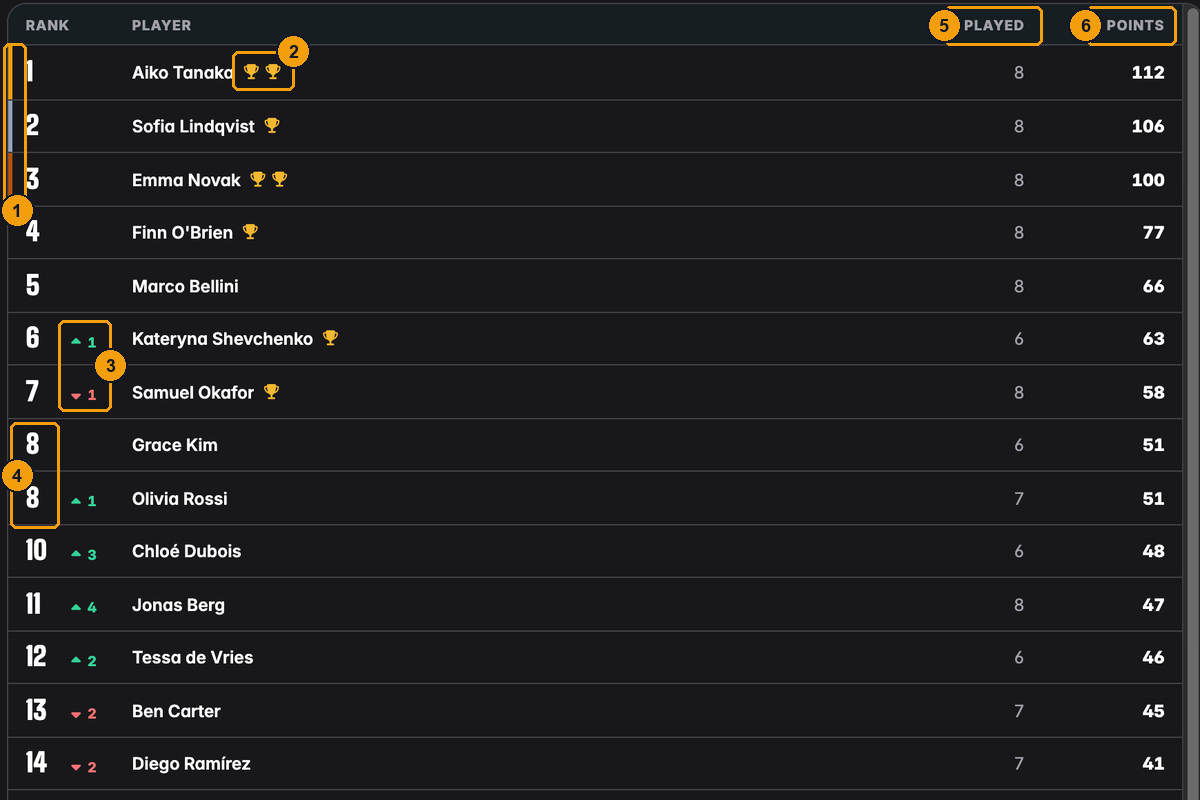
- The top three have a gold, silver and bronze stripe.
- One trophy for every tournament the player won. Aiko won two Spring League tournaments.
- The arrows show how a player's rank changed with the last tournament: Kateryna went up one place, Samuel went down one. No arrow means no change. A player who scored for the first time in the last tournament shows New.
- Players with the same points share a rank. Grace and Olivia both have 51 points and are both 8th; the next player is 10th.
- Played: how many of the league's tournaments the player played. Results typed in with Add result count too.
- Points: the total for the season, rounded to the decimal places of the scoring system.
How the total is made up:
- Every finished league tournament and every result entered by hand gives each league player points, calculated with the scoring system.
- A season adjustment (for example "+10 Volunteer bonus") is added on top as starting points. A tournament adjustment changes that one tournament's points. Players see only the result, never the adjustment or its reason.
- Only players on the league's list appear. Guests and club members outside the league never show up, even if they played in league tournaments.
- Within a tie, players are listed alphabetically.
The table loads more rows as you scroll, so big leagues stay fast.
The Statistics view
Open Statistics next to Leaderboard. At the top is the chart, below it the league records.
Position progression
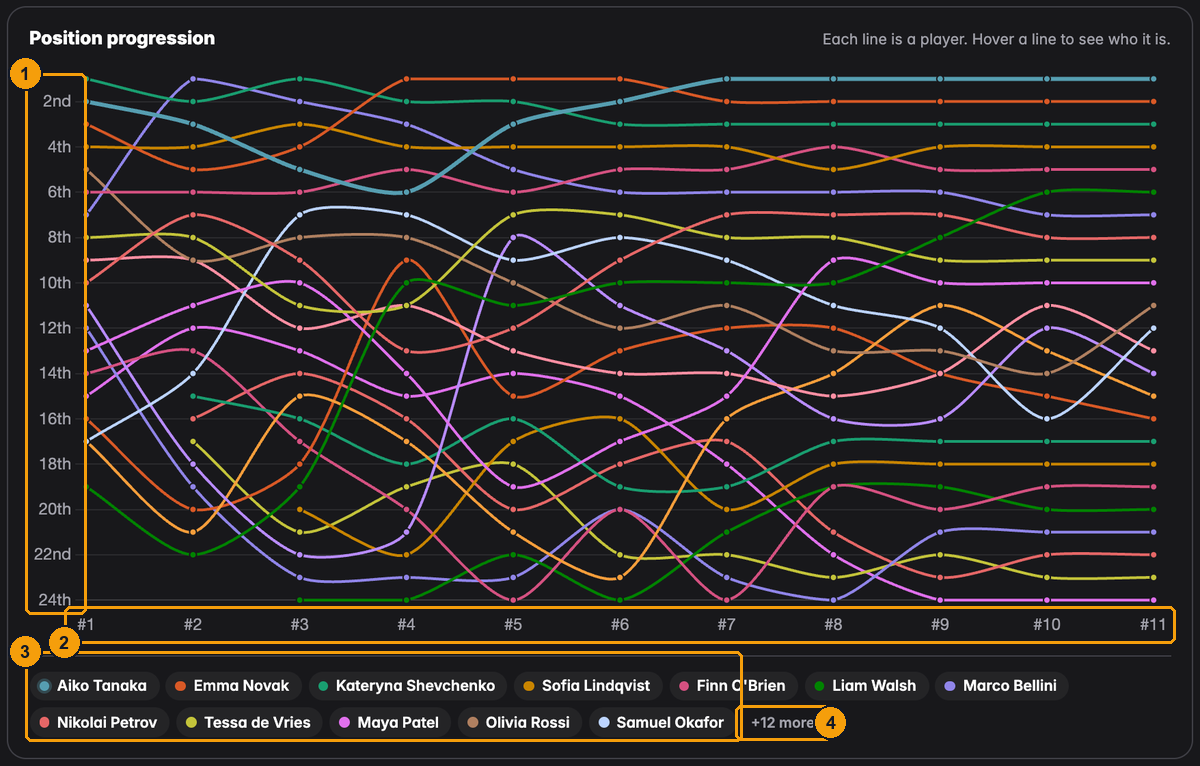
- The places, with 1st at the top.
- The league's tournaments in the order they were played: #1 is the first, #11 the latest.
- One coloured chip per player, in the order of the current table.
- In big leagues only the leading players get a chip; "+12 more" says how many are not listed.
Each line is one player's rank after each tournament. A line that climbs means the player moved up the table. A player appears from the first tournament they scored in; the season adjustments count from the start.
With 24 lines the chart is busy. Point at a line, or at a name below the chart, and that player is highlighted. On a phone or tablet, tap a name; tap it again to let go.
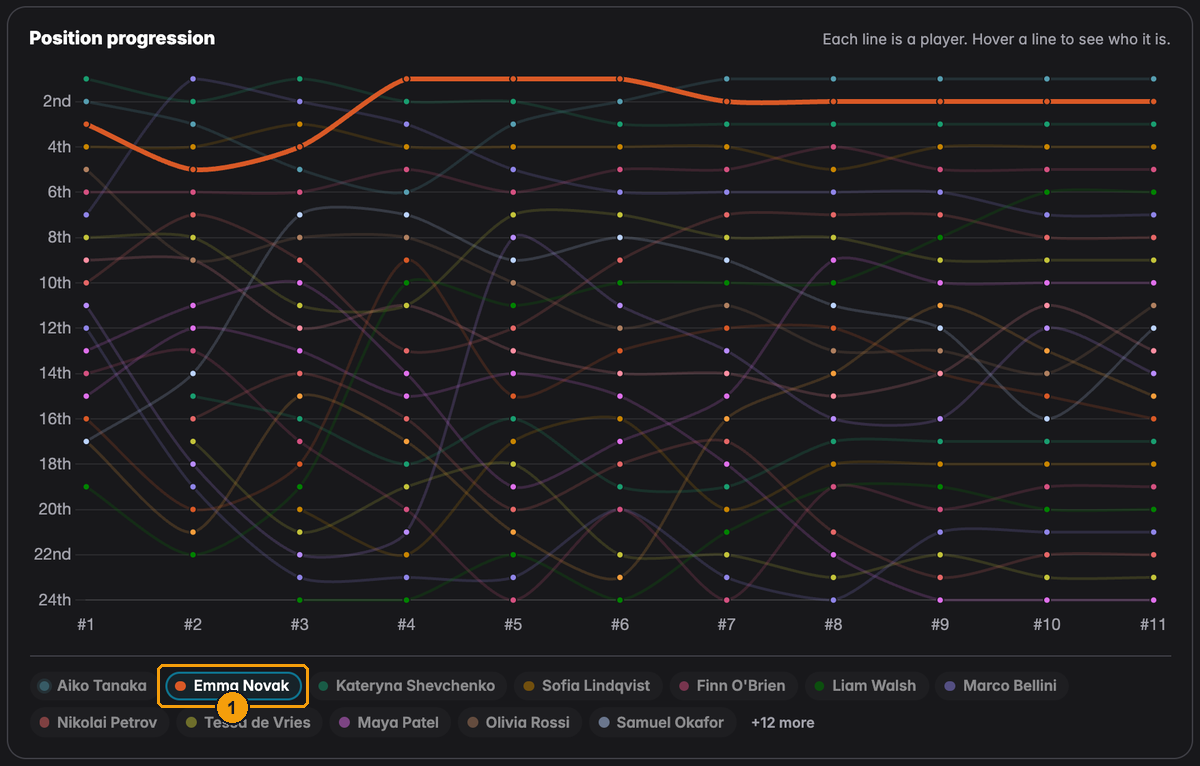
- Emma Novak is selected. Her line stands out and the others fade, so you can follow how she moved into the top places and stayed there.
The chart appears once the league has played its first tournament.
League records
Below the chart, five cards name the player who leads each record and show the number.
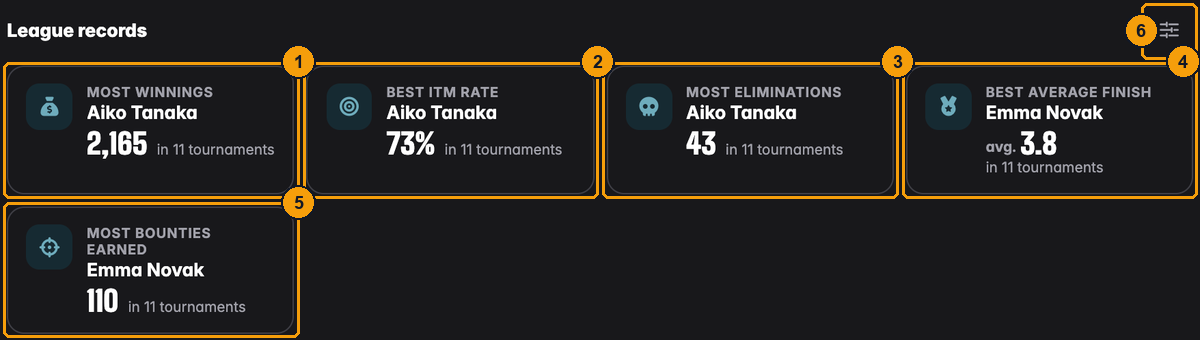
- Most winnings: the prize money won in the league's tournaments, added up. Bounties are not included. Aiko won 2,165 in 11 tournaments.
- Best ITM rate: how often a player finished in the money, as a share of the tournaments they played. Aiko cashed in 8 of 11 tournaments: 73 %.
- Most eliminations: knockouts added up over the season. Aiko knocked out 43 players.
- Best average finish: a player's finishing places added up and divided by the number of tournaments. Lower is better. Emma averages 3.8.
- Most bounties earned: bounty money collected in the season. Emma took 110.
- The settings button, for directors only (see the next section).
The small line under each number ("in 11 tournaments") says how many tournaments the record is based on.
Rules behind the records:
- Best ITM rate and Best average finish need a minimum number of tournaments, otherwise a player who played once and won would lead forever. The minimum is 3, or fewer while the league has played fewer than 3 tournaments. Until somebody qualifies the card says Needs 3 tournaments.
- When two players have the same value, the one with more tournaments wins the card; after that, the name decides.
- A card shows a dash and No qualifying player yet when nobody has a value, for example Most bounties earned in a league without bounty tournaments, or Most eliminations when knockouts were not tracked.
- Money is shown with a currency only when all league tournaments used the same one.
- Only league players are counted. A player whose only points come from an adjustment never wins a card.
Choosing which records members see
Not every club wants everyone's winnings on show. Directors decide which records members see with the settings button on the League records heading.
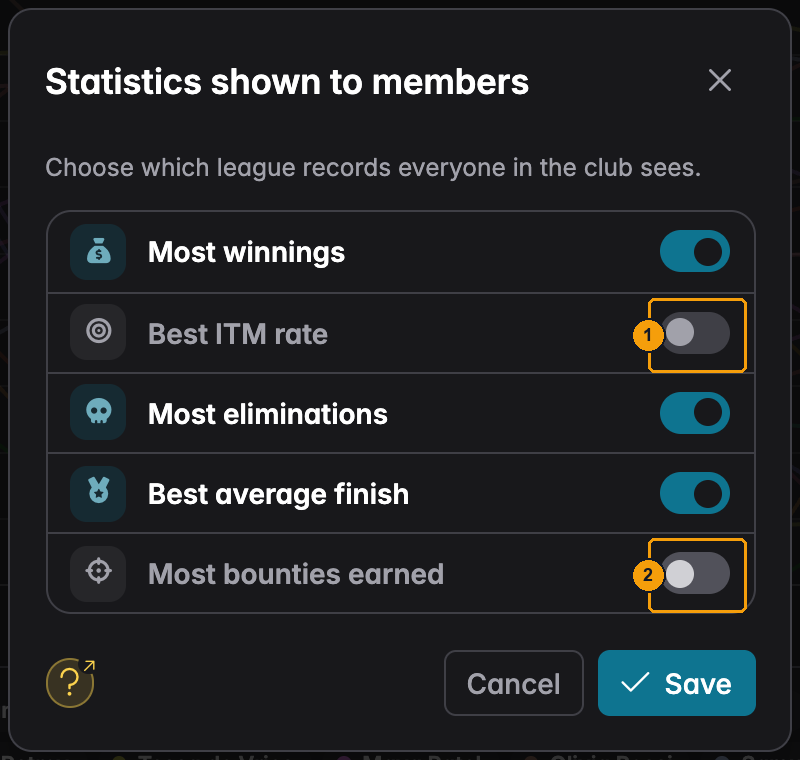
- Switched off: Best ITM rate is hidden from members.
- Most bounties earned is hidden too.
Press Save. Directors still see hidden records, dimmed and marked:
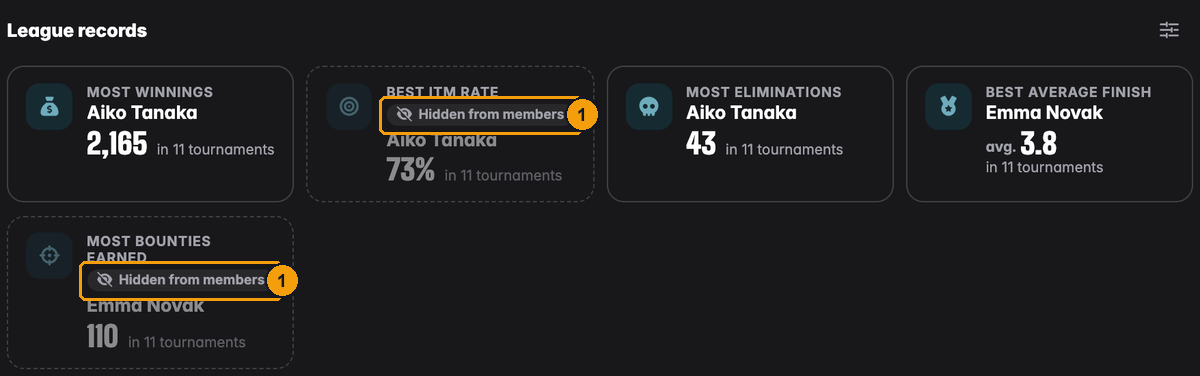
- Hidden from members on the two switched-off cards.
Members do not get those cards. If every record is hidden they read "The directors have hidden all league records." Hiding Best ITM rate or Best average finish also hides those numbers in the player sheet of the UHT Player app (see below).
What a league player sees
A league player opens the same pages, without the director tools:
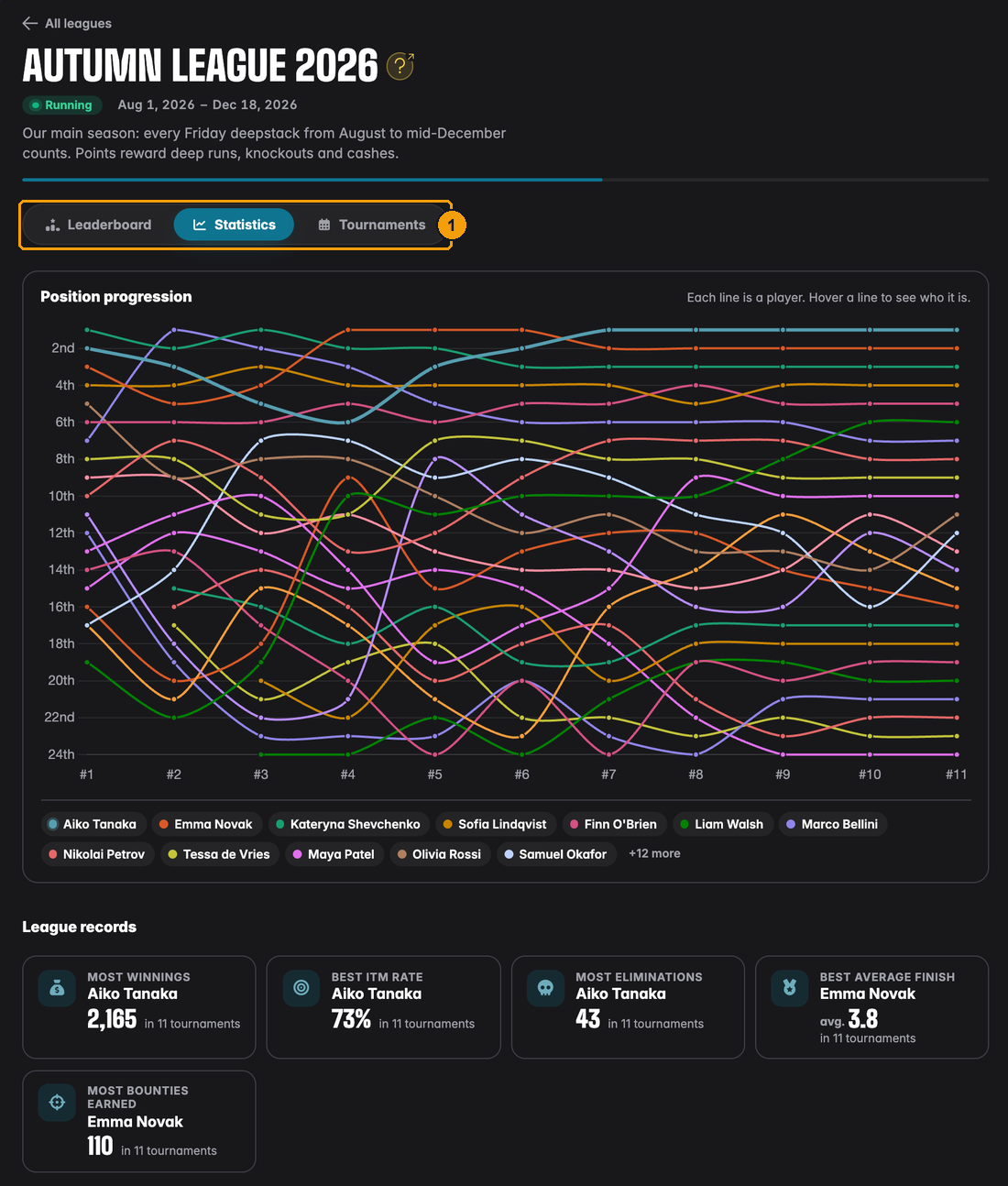
- Only Leaderboard, Statistics and Tournaments. No Players tab, no Adjust points, no Add result, and no settings button on the records.
In the UHT Player app, tapping a name on the leaderboard opens a short player sheet with that player's rank, points, tournaments played and wins, plus their best finish, average finish and ITM rate in this league. The last two follow the directors' choice of hidden records.
Points in the final standings
Every league tournament on the Tournaments tab has a trophy button that opens its final standings. League players can open it for tournaments they played; directors for all.
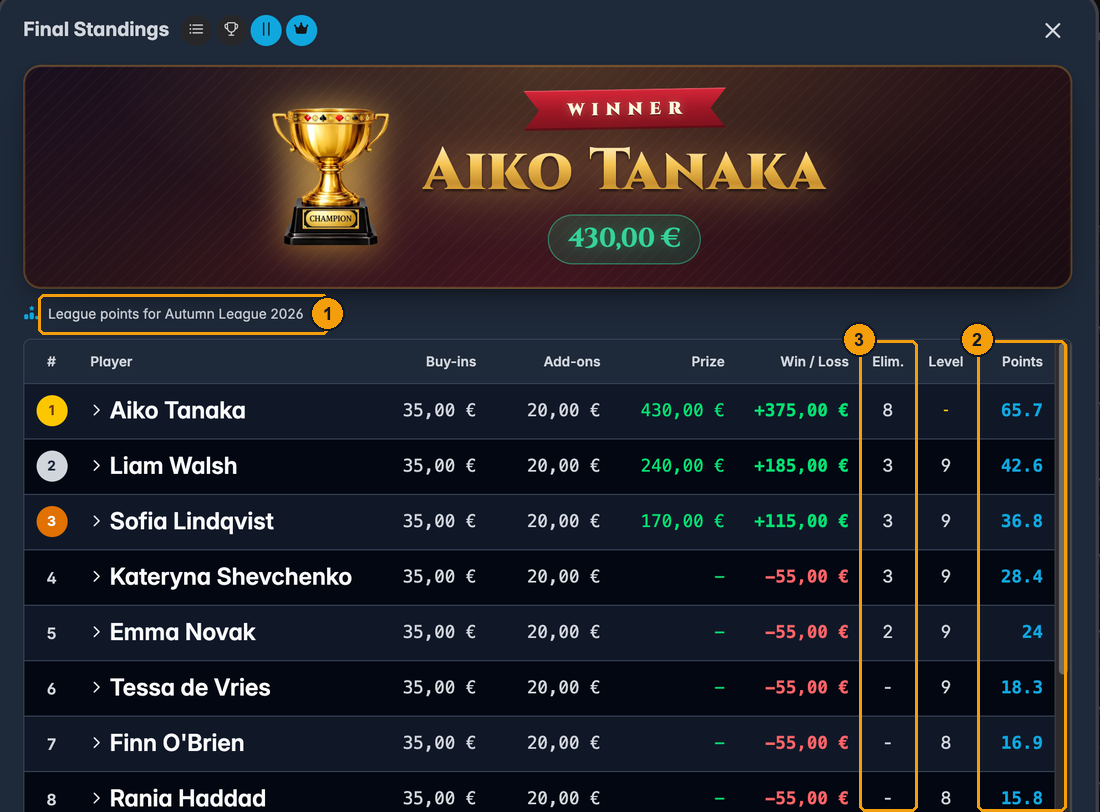
- "League points for Autumn League 2026" tells you which league the points belong to.
- Points: the official league points each player earned in this tournament, adjustments included.
- Elim.: the players each player knocked out, the value most formulas use for knockout bonuses.
A guest or a club member outside the league gets their points struck through, with a note that only league players score. The number shows what they would have got.
Members only see this read-only view. Payment details, emails and phone numbers are never part of it.
Leaderboard statistics
A leaderboard has the same table and chart, but no league records. Instead its Statistics view lists every result under the chart.
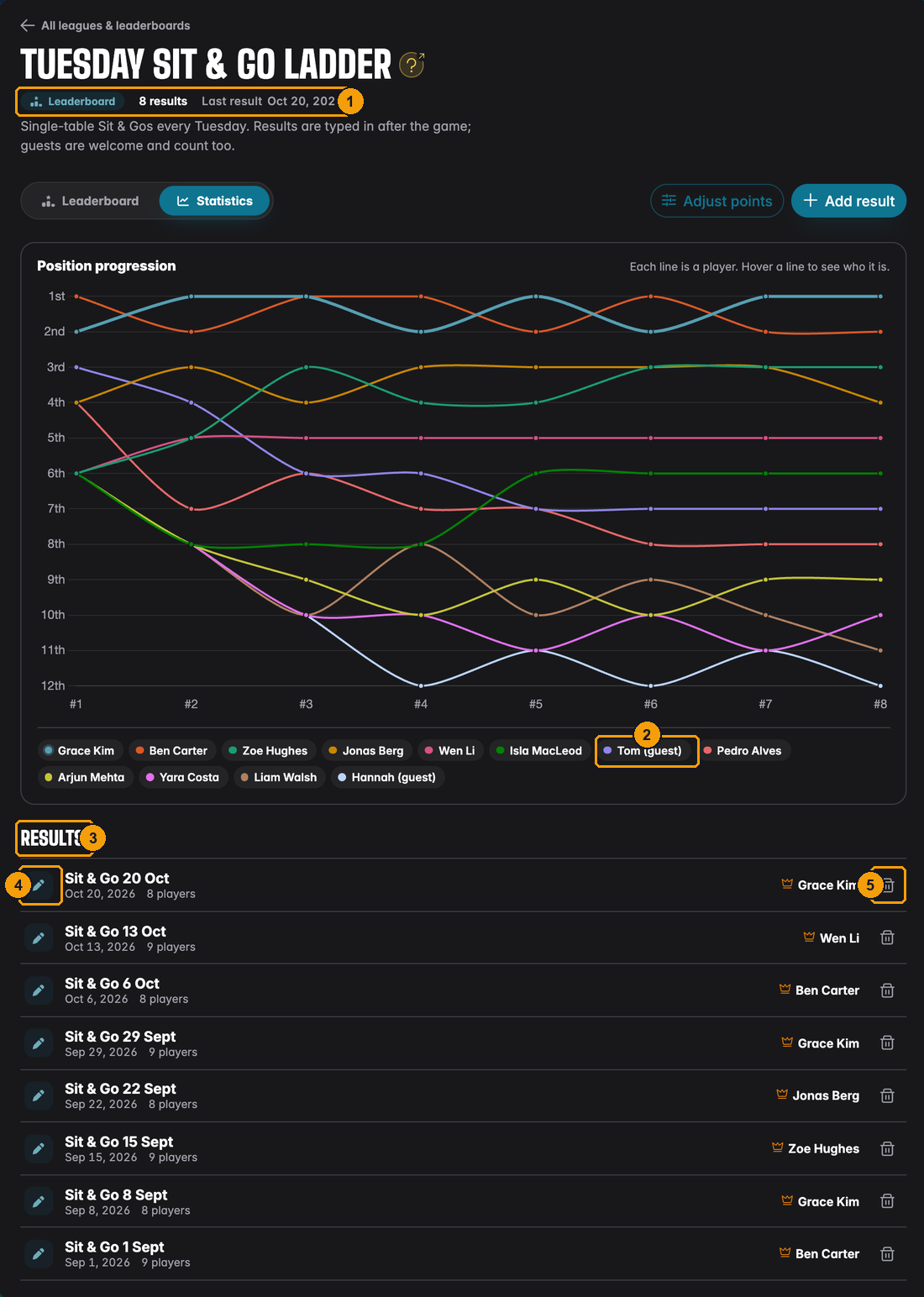
- The Leaderboard tag, the number of results and the date of the last one.
- Guests have their own line in the chart, like Tom (guest).
- Results: every game, newest first, with its date, number of players and winner.
- The icon shows whether a result was copied from a tournament or entered by hand.
- Directors can delete a result with the bin. The table and chart are recalculated straight away. To correct a result, delete it and enter it again.
A member's results in the club
Directors and floor staff can look up any member's results in the club. Open the Members tab and click a member.
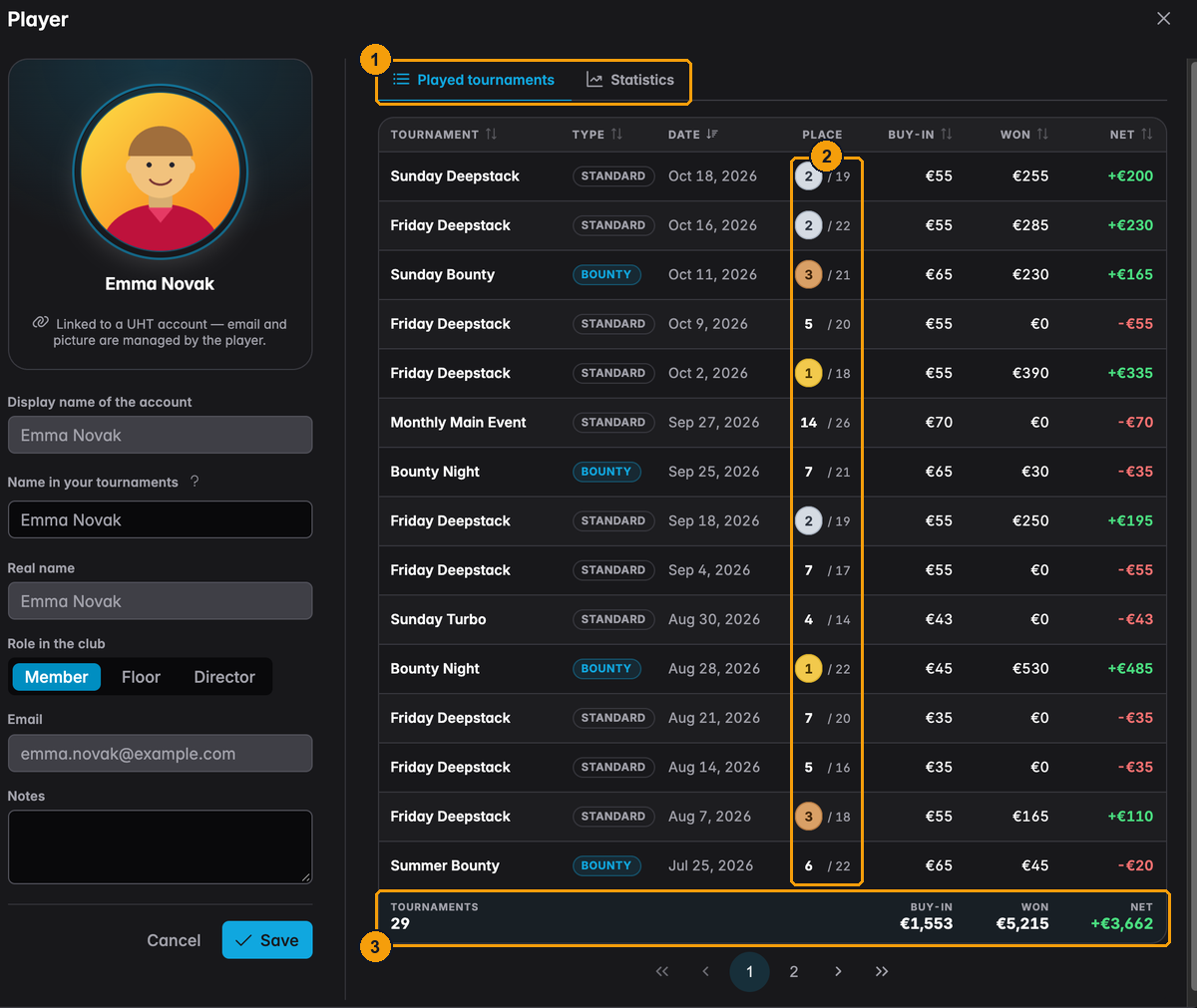
- Played tournaments lists every tournament of this club the member played, whoever hosted it. Statistics shows the same results as charts.
- Place against the size of the field: "2 / 19" means 2nd of 19. Podium places are coloured.
- The footer adds up the whole history: number of tournaments, total buy-ins, total won and the difference.
The Statistics tab:
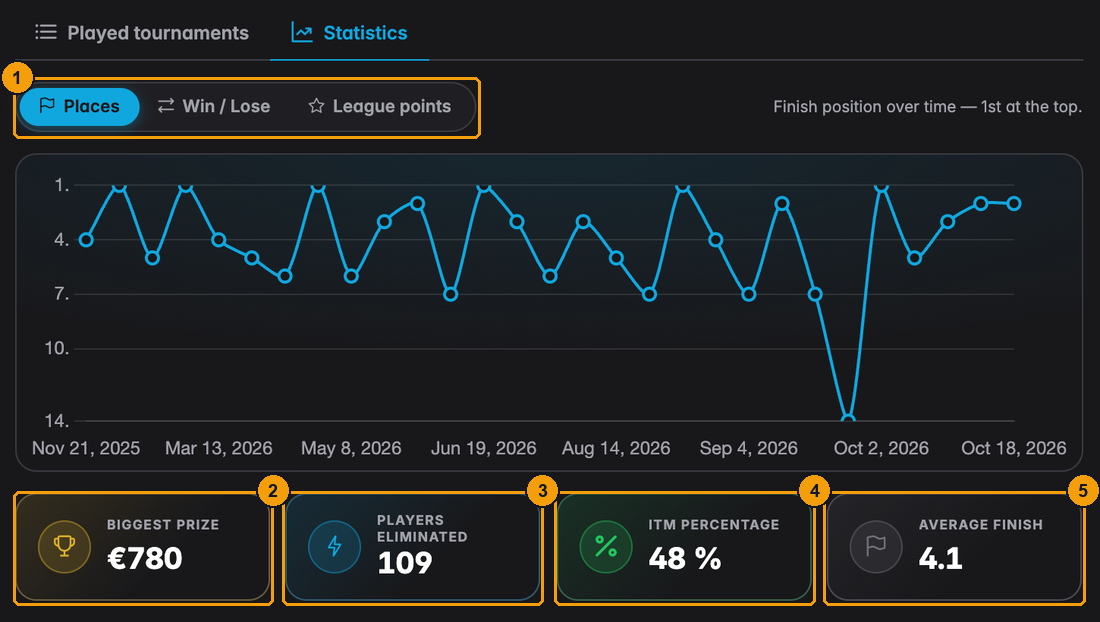
- What the chart shows: Places (finishing position over time, 1st at the top), Win / Lose (winnings and buy-ins per period) or League points.
- Biggest prize: the largest single prize.
- Players eliminated: all knockouts in this club's tournaments.
- ITM percentage: how often the member finished in the money.
- Average finish: the average finishing place.
With League points the chart shows points per day as bars, one colour per league:
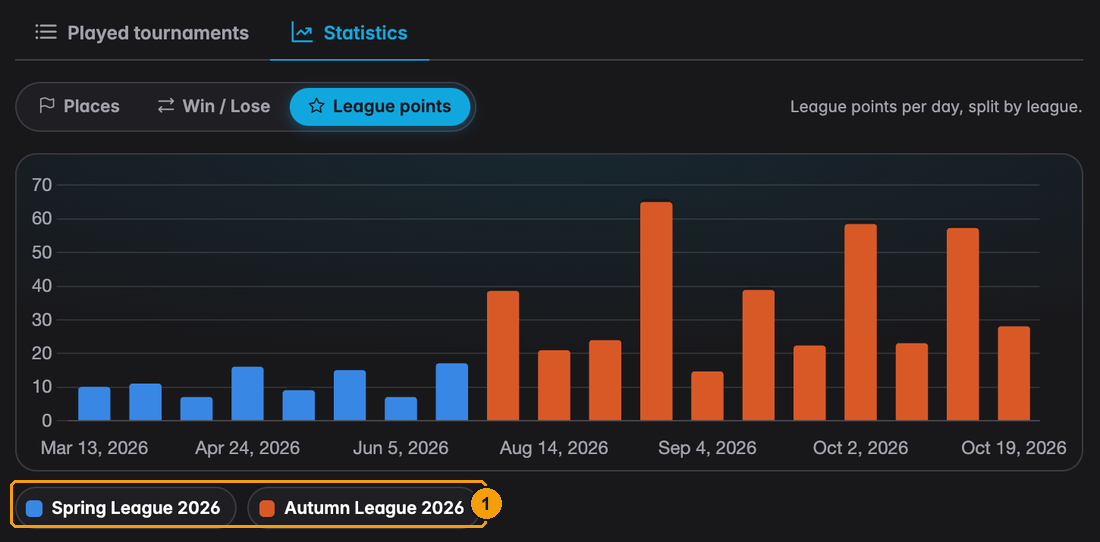
- Each league is a coloured button. Click one to hide or show it. Emma played the Spring League (blue) and is playing the Autumn League (orange).
Members see their own results, across all clubs and hosts, under My Results in their account menu. How results get recorded is explained on Player results and statistics.