League scoring
Every league and every leaderboard uses a scoring system. It is a small formula that says how many points a player gets for one tournament. UHT runs it for every player of every league tournament and adds the results up.
You do not need to be good at maths for this. Most clubs pick one of the ready-made formulas and never touch it again. If you want something of your own, this page explains every building block with poker examples.
Where scoring systems live
Scoring systems belong to the club, not to a single league, so the Friday league and the Sunday ladder can share one. You manage them in the Scoring system field of the league dialog (New League or Edit league, see Leagues and leaderboards).
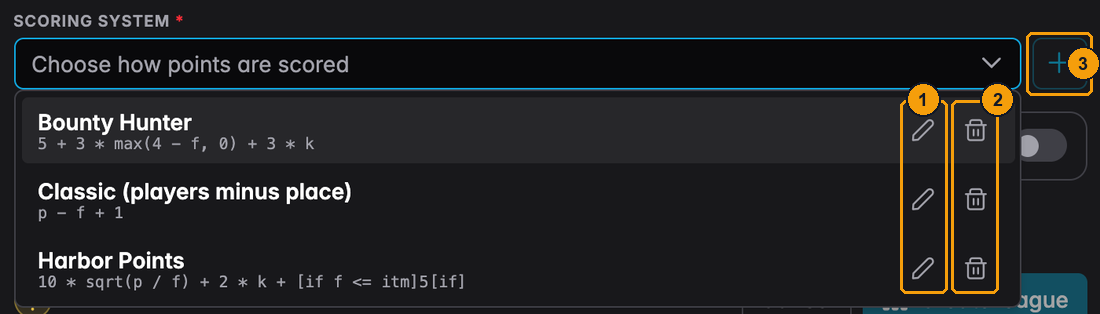
- The pencil edits a scoring system.
- The bin deletes it. A system that a league, leaderboard or tournament still uses cannot be deleted; UHT tells you which ones use it.
- The + creates a new one. Next to it, a pencil edits the system that is selected, the same as the pencil in the list.
Only directors see these buttons. A league admin can pick a system from the list but not change the list.
Harbor Lights has three:
| Name | Formula | In words |
|---|---|---|
| Classic (players minus place) | p - f + 1 | One point for every player you outlasted, plus one |
| Bounty Hunter | 5 + 3 * max(4 - f, 0) + 3 * k | 5 for showing up, a bonus for the top 3, 3 per knockout |
| Harbor Points | 10 * sqrt(p / f) + 2 * k + [if f <= itm]5[if] | A field-size curve, 2 per knockout, 5 extra for cashing |
The scoring system dialog
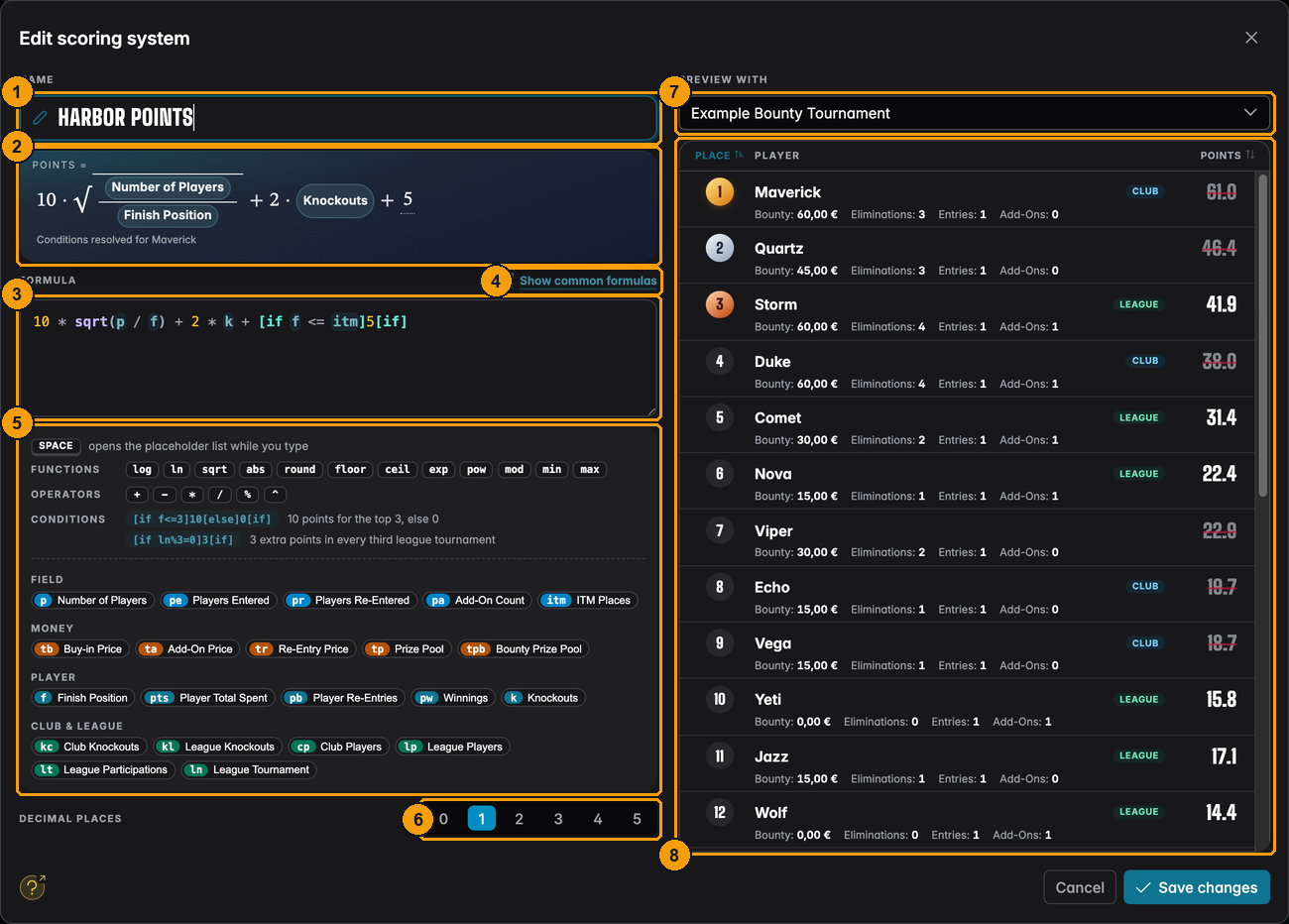
- Name of the scoring system.
- Points shows your formula the way you would write it on paper, with the placeholders as labelled chips. Hover over a player in the preview and conditions are filled in for that player ("Conditions resolved for Maverick").
- Formula: the box where you type.
- Show common formulas opens the formula library.
- The cheat sheet below the box: functions, operators, two condition examples and every placeholder, grouped into Field, Money, Player and Club & League. Click any chip to insert it at the cursor.
- Decimal places: 0 to 5. Points are rounded to this many places.
- Preview with chooses the tournament the preview uses.
- The preview: every player of that tournament with the points your formula gives them, updated as you type.
Press Save changes (or Save scoring system for a new one) when you are happy. Until then nothing changes for any league.
Typing a formula
You can type the short names (p, f, k ...) directly. If you do not remember them, press
Space in the formula box:
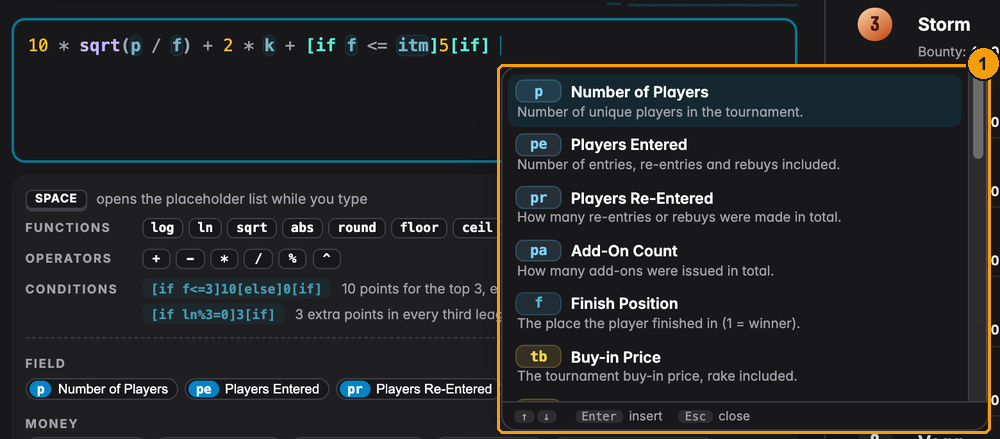
- The list shows every placeholder with its name and a one-line explanation. Use the arrow keys and Enter to insert one, Esc to close the list.
Upper or lower case does not matter, and spaces are ignored. Line breaks are fine too, which helps with long formulas.
The formula library
Show common formulas opens a collection of point systems used by real poker leagues.
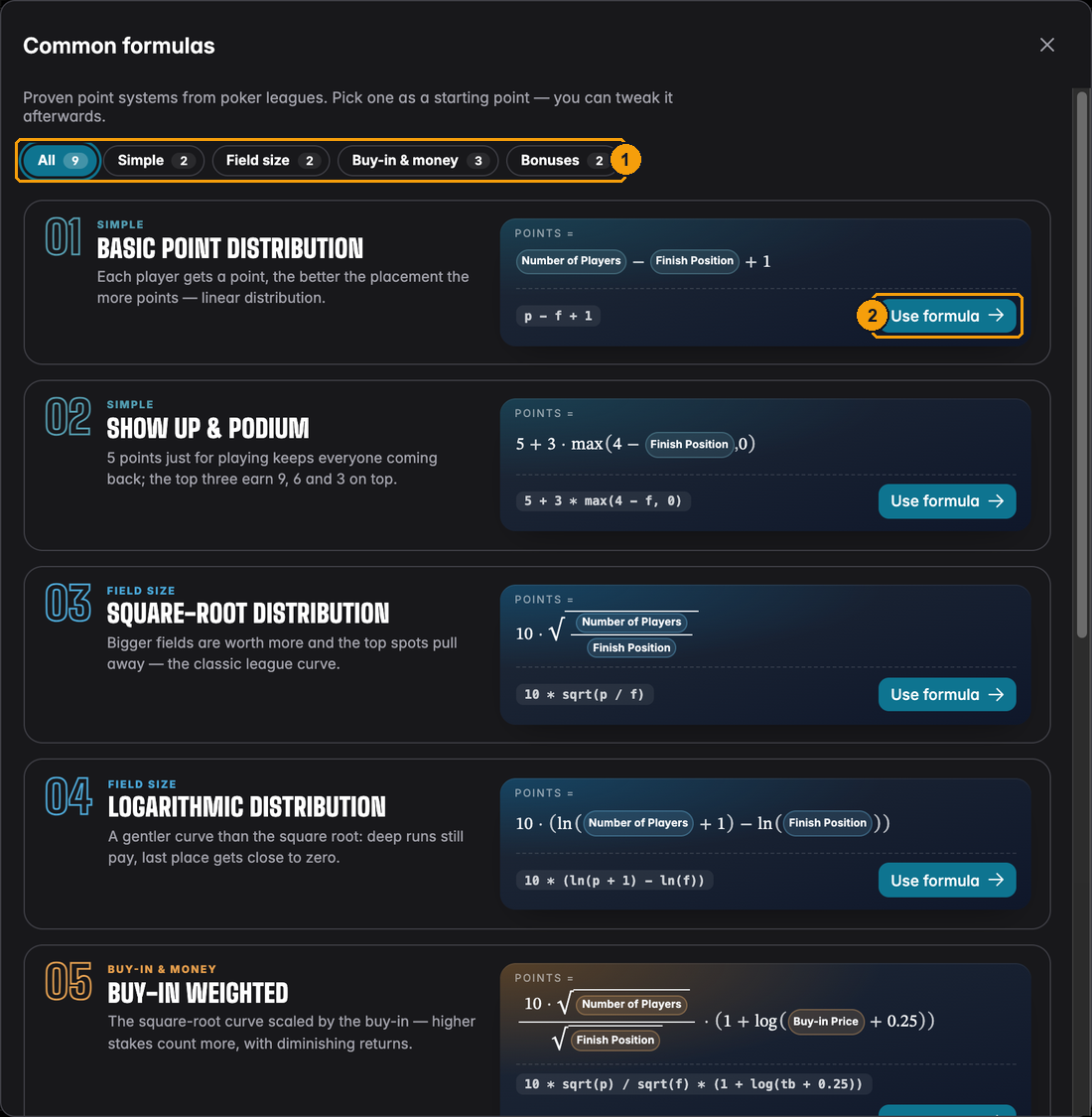
- Filter by kind: Simple, Field size, Buy-in & money or Bonuses.
- Use formula puts the formula into the editor. If your scoring system has no name yet, it gets the name of the formula. You can still change everything before saving.
What the library offers, with points for a 20-player tournament:
| Formula | Winner | 2nd | 5th | 10th | Last (20th) |
|---|---|---|---|---|---|
Basic Point Distribution p - f + 1 | 20 | 19 | 16 | 11 | 1 |
Show Up & Podium 5 + 3 * max(4 - f, 0) | 14 | 11 | 5 | 5 | 5 |
Square-Root Distribution 10 * sqrt(p / f) | 44.7 | 31.6 | 20 | 14.1 | 10 |
Logarithmic Distribution 10 * (ln(p + 1) - ln(f)) | 30.4 | 23.5 | 14.4 | 7.4 | 0.5 |
The other five add money or bonuses: Buy-in Weighted (bigger buy-ins count more), Rebuys Cost Points (every rebuy and add-on lowers the score), Share of the Prize Pool (points equal the percentage of the prize pool someone won), Cash Bonus (a point per player outlasted plus 10 for cashing) and Hunter (a point per player outlasted, 2 per knockout, minus 1 per re-entry).
The placeholders
A placeholder is a value UHT fills in for each player and tournament. The examples below use one tournament: a Friday Deepstack with 20 players, buy-in 35 EUR, re-entries and add-ons allowed, four paid places. Emma finished 3rd. She re-entered once, took the add-on and knocked out two players.
Field
| Short | On screen | What it means | Emma's example |
|---|---|---|---|
p | Number of Players | How many different people played. A player who re-entered still counts once. | 20 |
pe | Players Entered | All entries, re-entries and rebuys included. | 24 (20 players + 4 re-entries) |
pr | Players Re-Entered | How many re-entries or rebuys were made in total, by everyone. | 4 |
pa | Add-On Count | How many add-ons were taken in total. | 6 |
itm | ITM Places | How many places were paid. 0 if the tournament paid no prizes. | 4 |
Money
| Short | On screen | What it means | Emma's example |
|---|---|---|---|
tb | Buy-in Price | The buy-in, rake included. | 35 |
ta | Add-On Price | The add-on price, rake included. 0 without add-ons. | 20 |
tr | Re-Entry Price | The re-entry or rebuy price, rake included. 0 without re-entries. | 35 |
tp | Prize Pool | The total prize pool. | 960 |
tpb | Bounty Prize Pool | The money in bounties. 0 without bounties; for mystery bounties, the mystery bounty pool. | 0 |
pts | Player Total Spent | What this player paid: buy-in, re-entries and add-ons. | 90 (35 + 35 + 20) |
pw | Winnings | The prize money this player won, without bounties. A chop counts with the amount agreed. | 150 |
Player
| Short | On screen | What it means | Emma's example |
|---|---|---|---|
f | Finish Position | The place the player finished. 1 is the winner. Everyone in a chop counts as 1st. | 3 |
pb | Player Re-Entries | How often this player re-entered or rebought. | 1 |
k | Knockouts | How many players this player eliminated. Needs knockout tracking in the tournament. | 2 |
Club & League
| Short | On screen | What it means | Emma's example |
|---|---|---|---|
kc | Club Knockouts | How many club members this player knocked out. Guests do not count. | 2 |
kl | League Knockouts | How many players of this league this player knocked out. | 1 |
cp | Club Players | How many club members played. | 18 (2 guests) |
lp | League Players | How many league players played. | 15 |
lt | League Participations | How many tournaments of this league this player has played so far, this one included. | 6 |
ln | League Tournament | Which tournament of the league this is: 1 for the first, 8 for the eighth. | 8 |
A few details worth knowing:
- Club members are today's members. If somebody leaves the club, they stop counting as a club member for old tournaments as well.
ltandlncount in the order the tournaments were played, and a tournament's value never changes later. Emma's 6th tournament stays her 6th, even after she plays her 7th.- In a tournament without a league,
kl,lp,ltandlnare all 0. - In a leaderboard everyone listed counts as a club and league player,
so
cpandlpequalp, andkcandklequalk. When you type in a result by hand, UHT only asks for the values your formula actually uses.
Building a formula
Arithmetic
| Write | Means | Example |
|---|---|---|
+ - | plus, minus | p - f + 1 |
* / | times, divided by | 2 * k, p / f |
^ | to the power of | 2 ^ 3 is 8 |
% | what is left over after dividing | 7 % 3 is 1 |
( ) | do this part first | (p - f) * 2 |
Multiplication and division happen before plus and minus, as at school. When in doubt, use brackets.
Functions
| Function | What it does | Example |
|---|---|---|
sqrt(x) | square root | sqrt(16) is 4 |
max(a, b, ...) | the largest of the values | max(4 - f, 0) never goes below 0 |
min(a, b, ...) | the smallest of the values | min(k, 3) counts at most 3 knockouts |
round(x), floor(x), ceil(x) | round to the nearest whole number, down, up | floor(p / 10) |
abs(x) | drop the minus sign | abs(-5) is 5 |
log(x), ln(x), exp(x), pow(x, y), mod(x, y) | for the maths fans; the library uses them | log(100) is 2 |
ln written alone, without brackets, is the League Tournament placeholder. ln(x) with
brackets is the function.
Conditions
A condition gives points only when something is true. It has the shape
[if CONDITION]POINTS[else]OTHER POINTS[if]
The [else] part is optional; without it the condition gives 0 when it is not true.
| You want | Write |
|---|---|
| 10 points for the top 3, nothing for the rest | [if f <= 3]10[if] |
| 5 extra points for cashing | [if f <= itm]5[if] |
| 25 for the winner, 10 for everybody else | [if f = 1]25[else]10[if] |
| Double points in the last tournament of an 8-game season | (p - f + 1) * [if ln = 8]2[else]1[if] |
| 3 extra points in every third league tournament | [if ln % 3 = 0]3[if] |
| A bonus only for knocking out 3 or more and making the final table | [if k >= 3 and f <= 9]5[if] |
You can compare with =, != (not equal), <, >, <= and >=, and combine conditions with
and / or. Brackets are not allowed inside a condition; write [if f <= 3 and k > 0] rather
than [if (f <= 3) and (k > 0)].
Worked examples
"100 for the win, less for every place below, 5 per knockout"
max(110 - 10 * f, 10) + 5 * k
| Place | Knockouts | Points |
|---|---|---|
| 1st | 3 | 100 + 15 = 115 |
| 2nd | 1 | 90 + 5 = 95 |
| 5th | 0 | 60 |
| 10th and below | 0 | 10 (the max keeps everyone at 10 at least) |
"Bigger tournaments are worth more"
10 * sqrt(p / f) is the classic league curve. Winning against 30 players gives
10 * sqrt(30) = 54.8 points, winning against 10 gives 31.6. Finishing last always gives 10.
Harbor Points adds two things to it: + 2 * k for knockouts and + [if f <= itm]5[if] for
cashing. In a 20-player Friday Deepstack with four paid places, Emma (3rd, two knockouts) gets
10 * sqrt(20 / 3) + 4 + 5 = 34.8 points.
"Reward people for coming"
5 + 3 * max(4 - f, 0) gives everyone 5 points just for playing. The top three get 9, 6 and 3
on top. Players who come every week stay in the race even if they rarely win.
"Rebuys should cost you"
p - f + 1 - 2 * pb takes 2 points off for every re-entry. A player who wins after buying in
three times is not worth more than one who won with a single stack.
The preview
The preview on the right is the best way to check a formula. It shows what every player of a real tournament would get.
Preview with offers an Example Bounty Tournament and every finished tournament of your club:
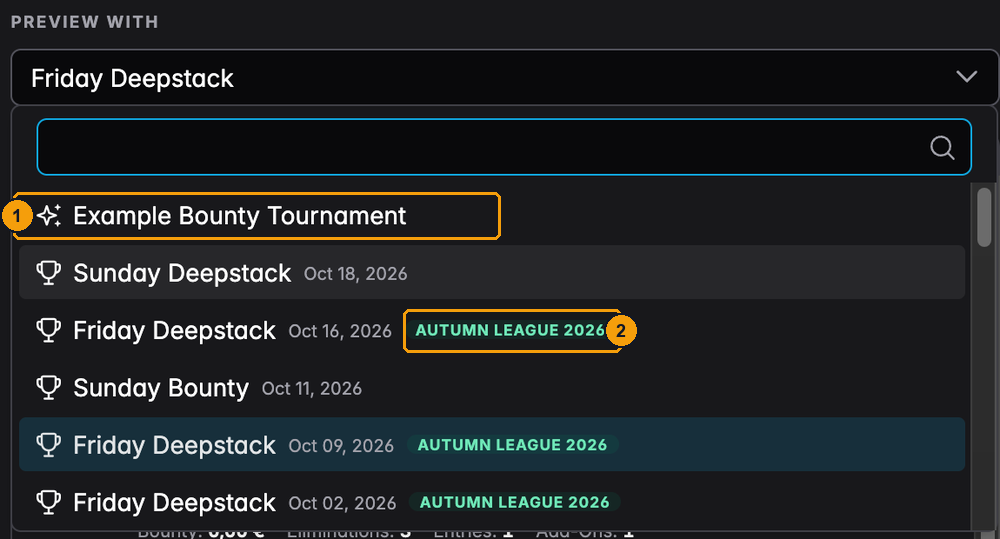
- Example Bounty Tournament is a made-up 25-player tournament with bounties, re-entries and add-ons. It changes a little each time you open the dialog.
- League tournaments carry the name of their league. Pick one of those to see exactly what your league players would get.
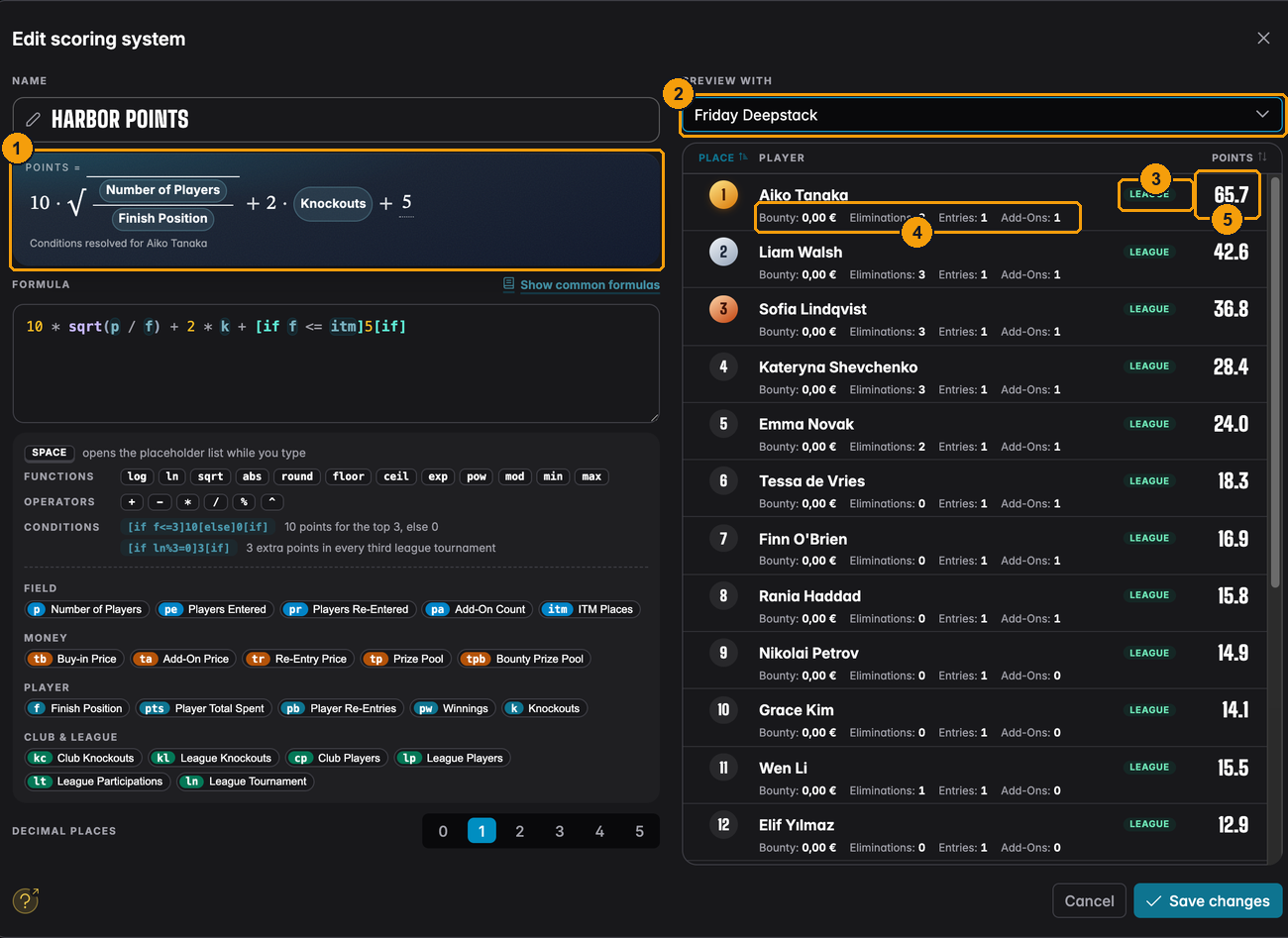
- The formula with conditions filled in for the player you point at.
- The tournament the preview uses.
- The League tag marks league players.
- Under each name: bounty, eliminations, entries and add-ons, the values most formulas use.
- The points this player would get.
Clicking the Place or Points column header sorts the list.
Club, league and struck-through points
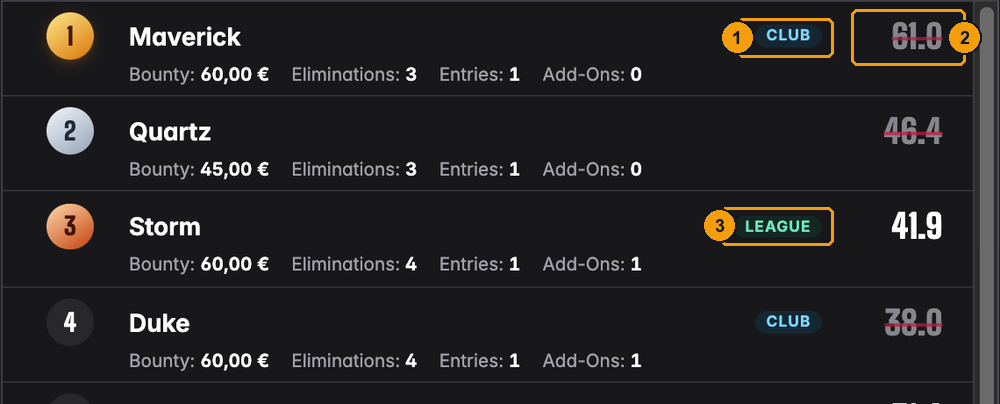
- Club: a club member who does not play in this league.
- Their points are struck through. Only league players score; the number shows what they would have got.
- League: a league player. These points count.
Players without a tag are guests.
When the formula has a mistake
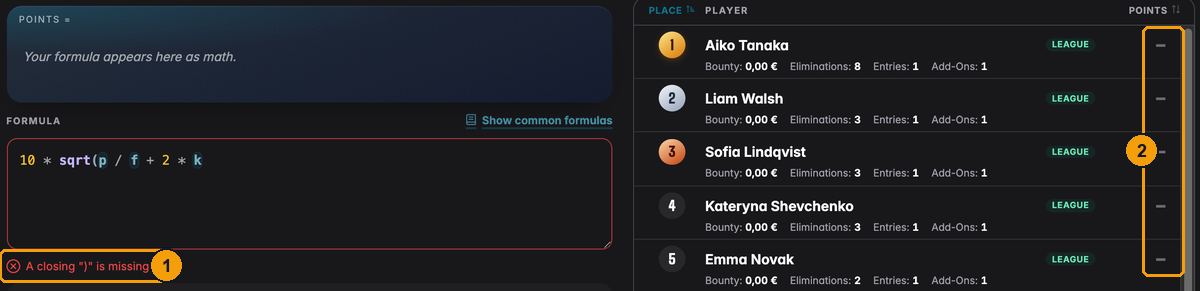
- Below the box UHT says what is wrong, here A closing ")" is missing. You cannot save until it is fixed.
- The preview shows no points while the formula cannot be read.
A formula can also be correct but impossible for some players, for example 100 / k for someone
with no knockouts (you cannot divide by zero). Then those players show a dash and a warning
appears above the preview. You can still save, but those players get no points for that
tournament, so it is better to fix it, for example with 100 / max(k, 1).
Decimal places
Decimal places decides how points are rounded and shown. Each tournament's points are rounded first, then added up.
- 0 gives whole numbers: easy to read on a display and to announce at the table.
- 1 or 2 avoids ties when the formula uses square roots or divisions. Harbor Points uses 1.
Ties share a rank: two players with 51 points are both 8th, the next player is 10th.
A league can also add up only each player's best results instead of all of them. That is a setting of the league, not of the formula: see Only count the best results.
Changing a formula during a season
UHT does not store the points of past tournaments. It calculates the whole season again each time somebody opens the league. That has two consequences:
- A change counts for the whole season. If you add a knockout bonus in October, players get it for their August and September knockouts too. The table can look very different the next time it is opened.
- Every league using the system changes. If the Friday league and the Sunday ladder share a scoring system, editing it changes both.
That is usually what you want when you fix a mistake. If you want a new rule to apply only from
now on, use a condition such as [if ln >= 6]...[if] (from the sixth league tournament), or
create a new scoring system for next season.
Manual corrections made with Adjust points stay as they are when you change the formula. See Point adjustments.
To score only one tournament differently, for example a season final with 1.5 times the points, give it its own scoring system instead of changing the league's. See A different scoring system for one tournament.