Connect a TV with a code
Getting a poker clock onto a television used to mean typing a long link with a remote control, one letter at a time, on an on-screen keyboard. The QR code on the display does not help either — a TV cannot scan one.
So UHT turns it around. The screen asks to be added, and you accept from your phone.
On the TV, open:
uht.app/connect
That is the whole address. It is short enough to type once with a remote, and worth bookmarking on the TV afterwards.
The page shows a six-digit code. You type that code into the Add Display dialog on your controller, and the television switches to the tournament clock on its own.
The code is what joins a screen to a running multi-monitor session, so the tournament must have multi monitoring enabled — and that needs a free UHT account. The TV itself never logs in: the code is enough.
What the screen shows
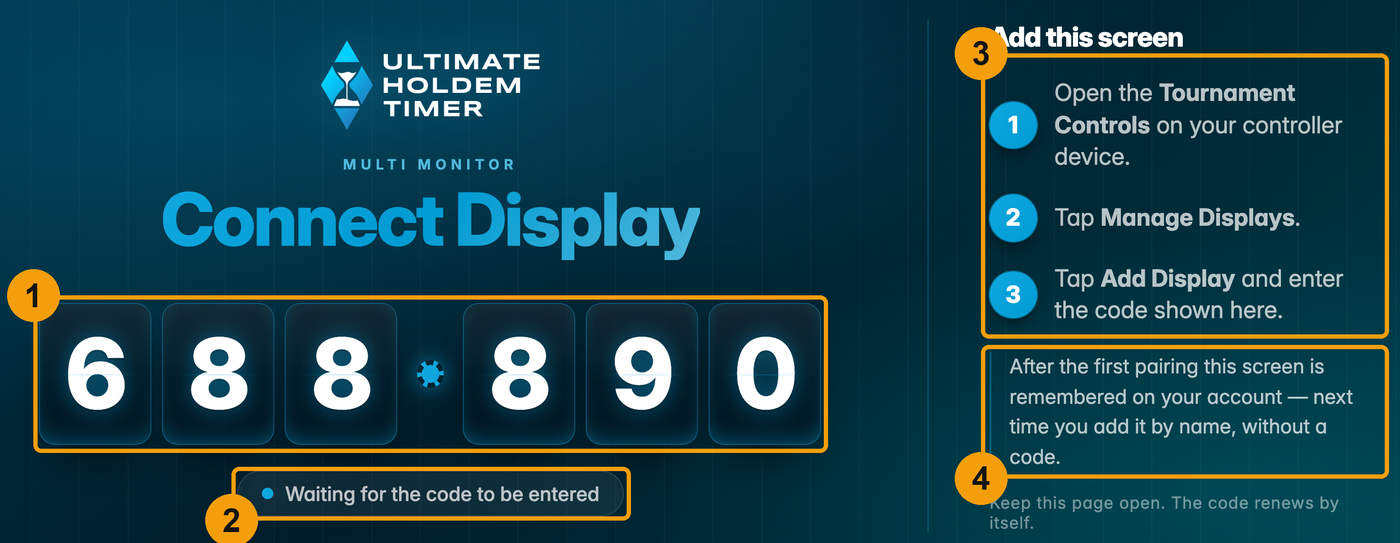
| # | On screen | What it is for |
|---|---|---|
| 1 | The six-digit code | Deliberately huge. It has to be readable from where you are standing with your phone, not from the sofa in front of the TV. Shown as 123 - 456, three digits and three digits. |
| 2 | The status line | What the screen is doing right now — see the status line below. |
| 3 | The three steps | The same instructions as this page, on the TV itself, so whoever is standing at the television does not need to look anything up. |
| 4 | The memory note | Tells you the screen will be remembered after this first pairing. Once it is, this box is replaced — see The screen is remembered. |
The page has no header, no footer and no menu. It is designed to be looked at from across a room, on a device whose only input is a remote.
The status line
The small pill under the code always says what is happening. It is the first thing to look at when a pairing does not work.
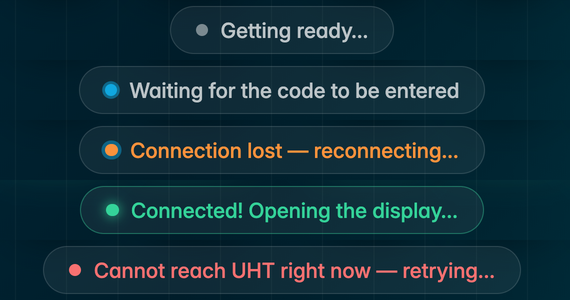
| Status | Meaning |
|---|---|
| Getting ready… | The screen is registering with UHT. Lasts a moment. |
| Waiting for the code to be entered | Normal. The code on screen is live and can be used. |
| Connection lost — reconnecting… | The TV's connection dropped. UHT retries by itself, with growing pauses. The code on screen is not usable until it says Waiting again. |
| Connected! Opening the display… | Somebody entered the code. The tournament clock opens a second later. |
| Cannot reach UHT right now — retrying… | The screen cannot reach UHT at all — normally the TV's own internet. Check the television's network, then use the connection test. |
How the code behaves
It renews itself every ten minutes. A code you glanced at earlier stops working. You do not have to do anything — the screen swaps in the new one while it waits.
It only works while the page is open. Leave the connect page — including by joining a tournament — and the code stops being valid immediately. There is no window in which an old code, photographed or overheard, can still be used.
It is used up on success. Once a screen has been added, its code is discarded. A fresh one is issued the next time that screen waits on the connect page.
Wrong codes are rate-limited. After ten failed attempts from the same controller, code entry is blocked for a few minutes.
Together this means the code is safe to have on a screen in a public room. The worst a stranger who reads it can do is add their own tournament to your television — which they would have to do while standing in front of it, within ten minutes, before you do.
As long as the connect page is on screen, the TV counts as online and appears as a tappable button in the Add Display dialog. That is what makes the second and every later tournament a one-tap affair.
The screen is remembered
After the first successful pairing, UHT remembers the screen on your account and gives it a name — "TV 1", "Tablet 2", "Computer 1", depending on what kind of device it detected. The connect page then says so:
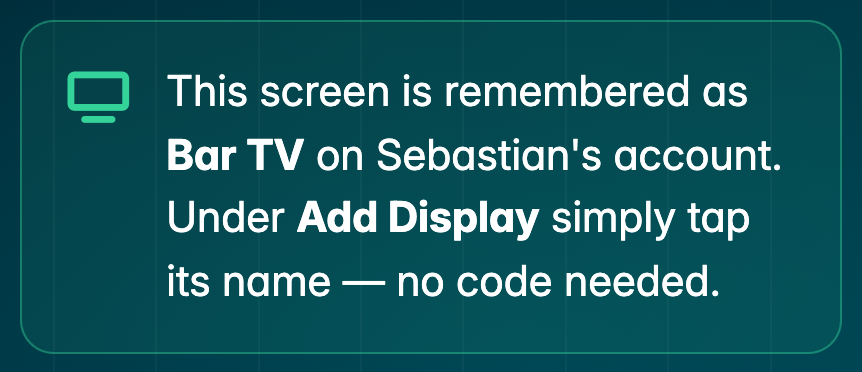
From then on you do not need the code at all. The screen simply shows up by name in Add Display, and one tap sends it to the tournament.
Two details worth knowing:
- The name is yours to change. Rename it to "Bar TV" or "Back room" from the Add Display dialog. Well worth doing the moment you have more than one.
- A screen belongs to one account at a time. Pair a TV that already belongs to somebody else and it moves to your account. That is deliberate: a bar's television can be used by whoever runs tonight's game, and the code is all they need — never your login.
You can remember up to 25 screens per account.
When the tournament ends
A screen that was added this way returns to uht.app/connect by itself a few seconds after the tournament finishes, and shows a fresh code. It is ready for the next game without anybody touching the television.
Which devices work
Anything with a browser: a smart TV, a Fire TV stick, a Chromecast with Google TV, a tablet propped on the bar, an old laptop, a spare phone. UHT recognises the kind of device from its browser and names it accordingly.
The connect page needs the same thing the clock does — WebSockets — which every browser has supported since about 2013. The full compatibility table is on the multi monitoring page.
If it does not work
| Symptom | What to do |
|---|---|
| The status says Cannot reach UHT | The TV has no working internet. Check the television's network settings, then run the connection test on it. |
| The code is there, but Connect says no screen is showing it | Check the digits, and check that the TV still shows Waiting for the code to be entered. A code from a reconnecting screen does not work. |
| The TV shows the connect page but is grey in Add Display | Give it a few seconds — the list refreshes every five seconds. If it stays grey, reload the connect page on the TV. |
| Too many wrong codes | Wait a few minutes; the block lifts by itself. |
| The page suddenly stops working after you opened it twice | Only one tab per device can hold the connect page. Close the extra tab and reload. |