Club financials
Every club has someone who ends up holding the cash box. At the end of the night they count the money, pay the winners, pay the dealer, and write the rest down somewhere: a notebook, a spreadsheet, the back of a blind sheet. A few months later nobody can say whether the Friday deepstack actually pays for itself.
Financials is that notebook, built into your club. Each club tournament books itself when it finishes: buy-ins, re-entries, add-ons, rake, prizes and bounties. You add the rest: hall rent, the dealer, pizza, drink sales, a sponsor's cheque, the new set of cards. At any point you can see what the club made in a week, a month, a quarter or a year, and print it as a PDF for the club meeting.
This page covers the ledger itself. Charts and the PDF report have their own page: Financial statistics & reports.
All examples below use the demo club Harbor Lights Poker Club, which plays a deepstack every Friday, a bounty night once a month, a monthly Main Event, and two cash games a month.
Who can see the books
Only directors of the club see the Financials tab. Floor staff and members don't get it, and nothing in the books is ever shown to players. If you want someone to help with the books, they need the director role (see Changing a role).
Commercial license
Club financials are part of the UHT Commercial license, and they follow the club owner's account (the person who founded the club). Once the owner has an active Commercial license, every director of that club gets the real books. The other directors don't need a license of their own. When the owner's license runs out, the tab goes back to example data. Nothing is deleted.
See Commercial licensing for prices and how to buy it.
What you see without the license
A club whose owner has no Commercial license still has the Financials tab, but it shows example data. The first time you open it, this window explains what's going on:
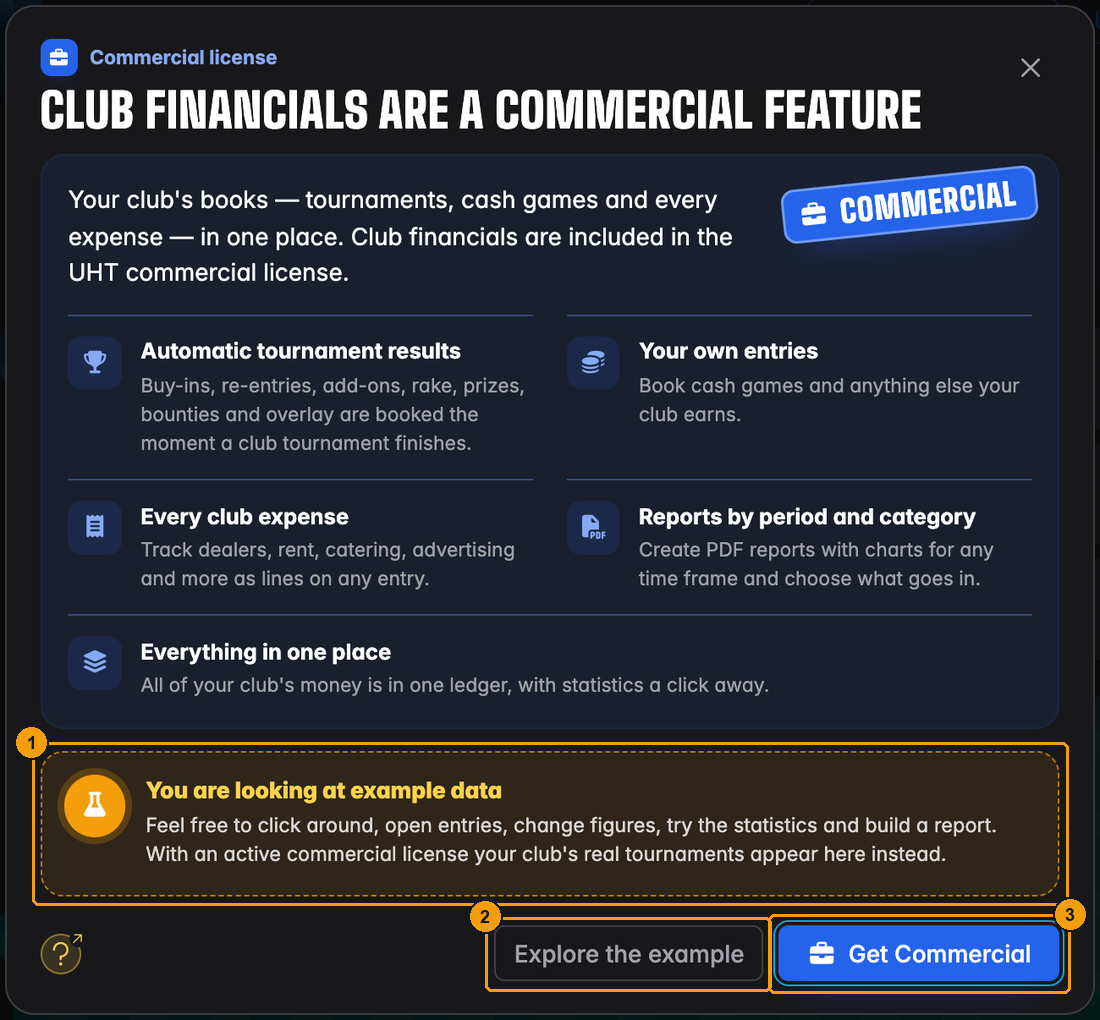
- You are looking at example data. The ledger behind this window is made up. It belongs to an imaginary club and has nothing to do with yours.
- Explore the example closes the window so you can try everything out: open entries, change figures, look at the statistics and build a test report.
- Get Commercial opens the pricing. If you are a director but not the owner, the window tells you to ask the club owner instead, because only the owner's license counts.
The example ledger carries an Example data badge next to the title, so you always know you are not looking at real money:
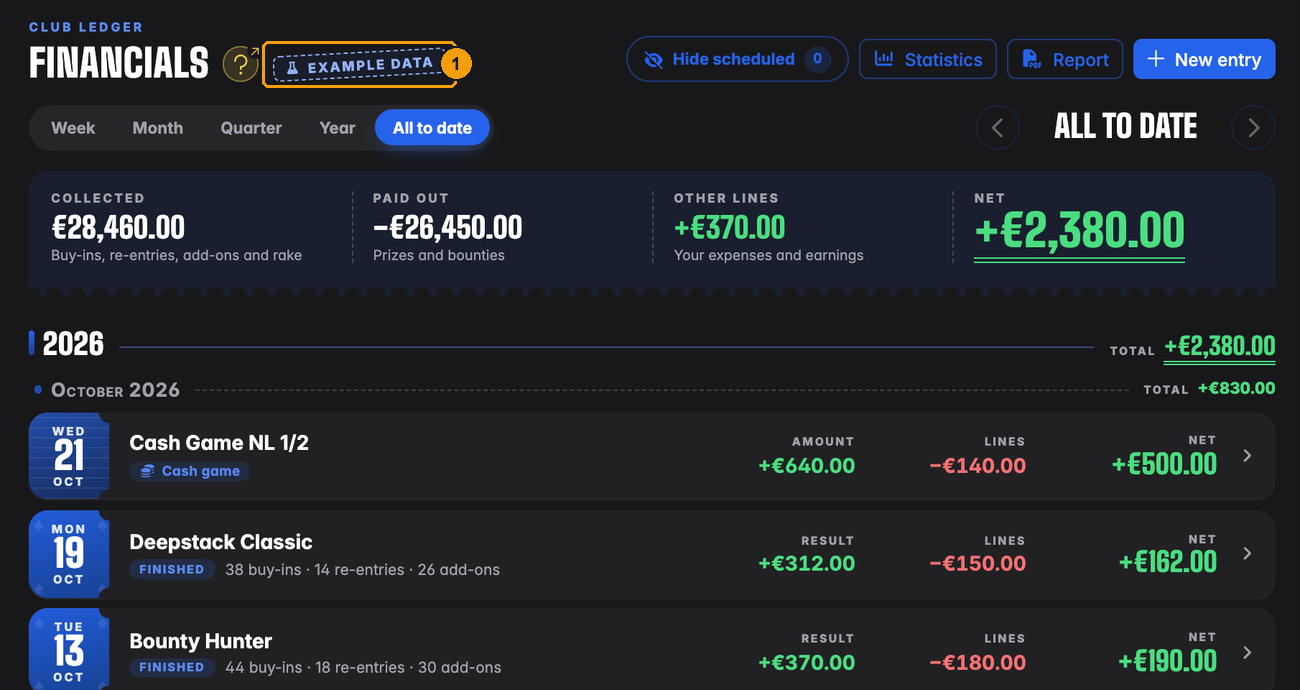
- Example data badge.
At the bottom of the list there is a reminder banner with the same Get Commercial button:
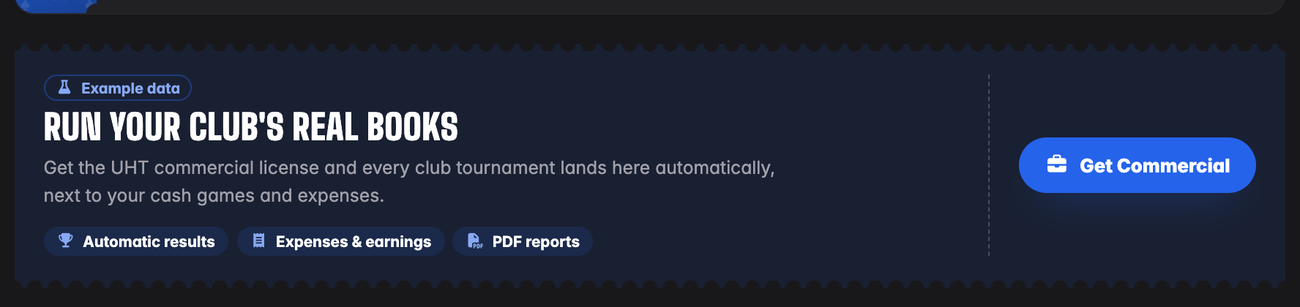
You can't book real entries in the example. New entry and Add expense / earning open the license window instead.
UHT keeps track of your club tournaments in the background, license or not. When the owner buys the Commercial license, every club tournament you have already played shows up in the books, with its figures. You don't start from zero.
Finding the ledger
Open your club and click the Financials tab. The page is called Club ledger · Financials:
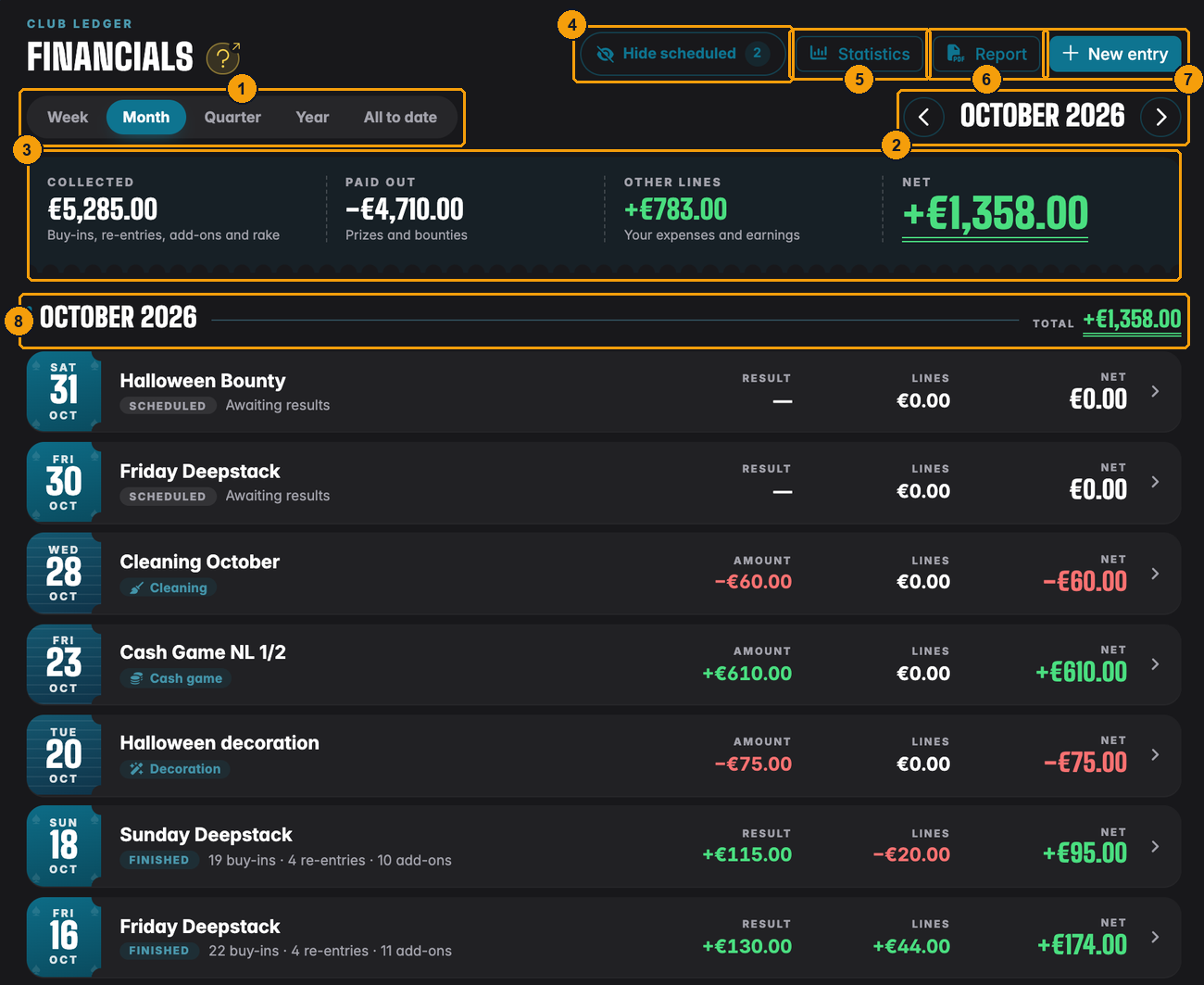
- Period buttons: Week, Month, Quarter, Year or All to date.
- The period you are looking at. The arrows go one period back or forward. When you have moved away from the current period, a Today button appears that jumps back.
- The totals strip for the whole period (explained below).
- Hide scheduled leaves tournaments that haven't started yet out of the list and the totals. The small number shows how many there are.
- Statistics opens the charts for this period.
- Report builds a PDF.
- New entry books something by hand: rent, a cash game, a purchase.
- A period heading with the period's total on the right.
The ledger opens on the current year. Newest entries are at the top. A page shows 20 entries, and a page switcher appears at the bottom when there are more.
The totals strip

- Collected: everything players paid at your tournaments in this period. Buy-ins, re-entries (or rebuys), add-ons and rake, all added together.
- Paid out: what went back to players as prizes and bounties.
- Other lines: everything you booked yourself. Expenses (rent, dealer, food) count as minus, earnings (cash games, drink sales, sponsors) as plus.
- Net: what's left for the club. That's Collected minus Paid out, plus Other lines.
In October 2026, Harbor Lights collected €5,285 at its tournaments and paid €4,710 back to the players. So the tournaments themselves left €575. Add the cash games, the membership fees and the drink sales, and take off rent, cleaning and decoration (+€783 together), and the club ends the month on +€1,358.
Reading a row
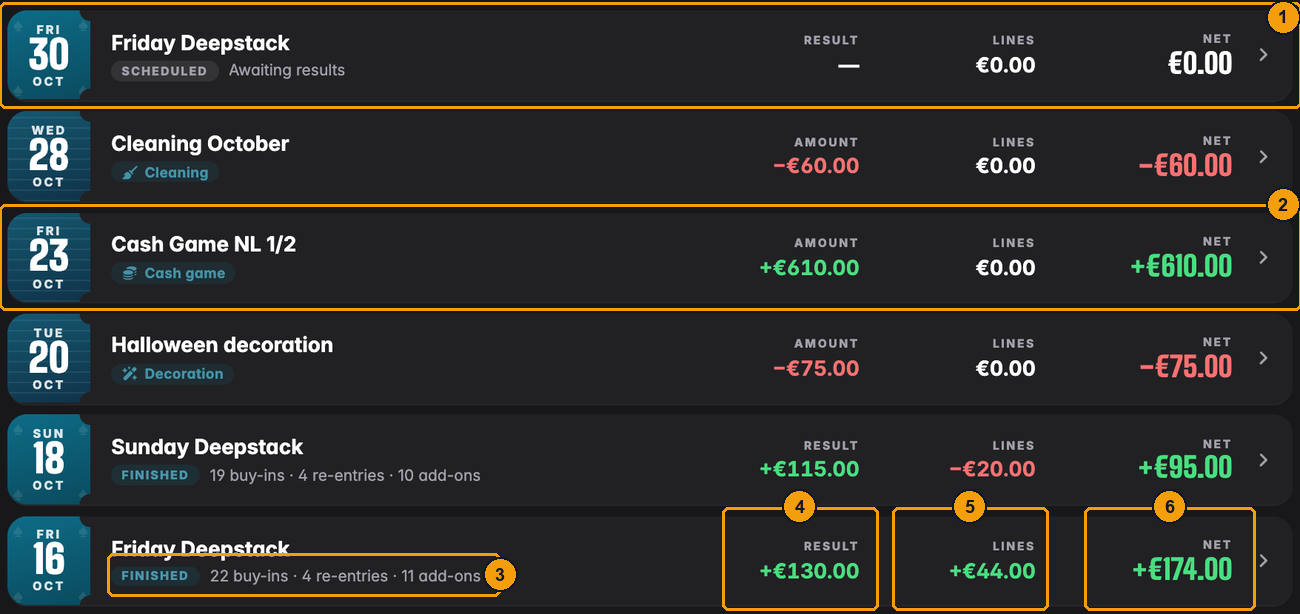
- A scheduled tournament. It's in the books as soon as you schedule it, marked Scheduled and Awaiting results. Its amounts stay at €0.00 until it finishes.
- A booked entry, one you added by hand. It shows its type (here Cash game) and its Amount.
- A finished tournament lists how many buy-ins, re-entries and add-ons it had.
- Result: what the tournament itself left for the club (see What a tournament books).
- Lines: the expenses and earnings you added to this entry, such as the dealer and drink sales for that night.
- Net: Result plus Lines. Green means the club made money, red means it lost money.
Click any row to open the entry.
Tournaments go through these labels:
| Label | What it means |
|---|---|
| Scheduled | Planned, not started yet. Waits for its figures. |
| Live | Running right now. |
| Finished | Done. Its figures are in. |
| Cancelled | Called off. It only stays in the books if you had already added lines to it, otherwise it disappears. |
| Booked | Not a tournament: an entry you added yourself with New entry. |
Hiding scheduled tournaments
Scheduled tournaments are useful: you can add the dealer you've already booked for next Friday. But a list full of €0.00 rows gets in the way when you want to look back. Click Hide scheduled and they disappear from the list, the totals and the statistics. Click it again to bring them back.
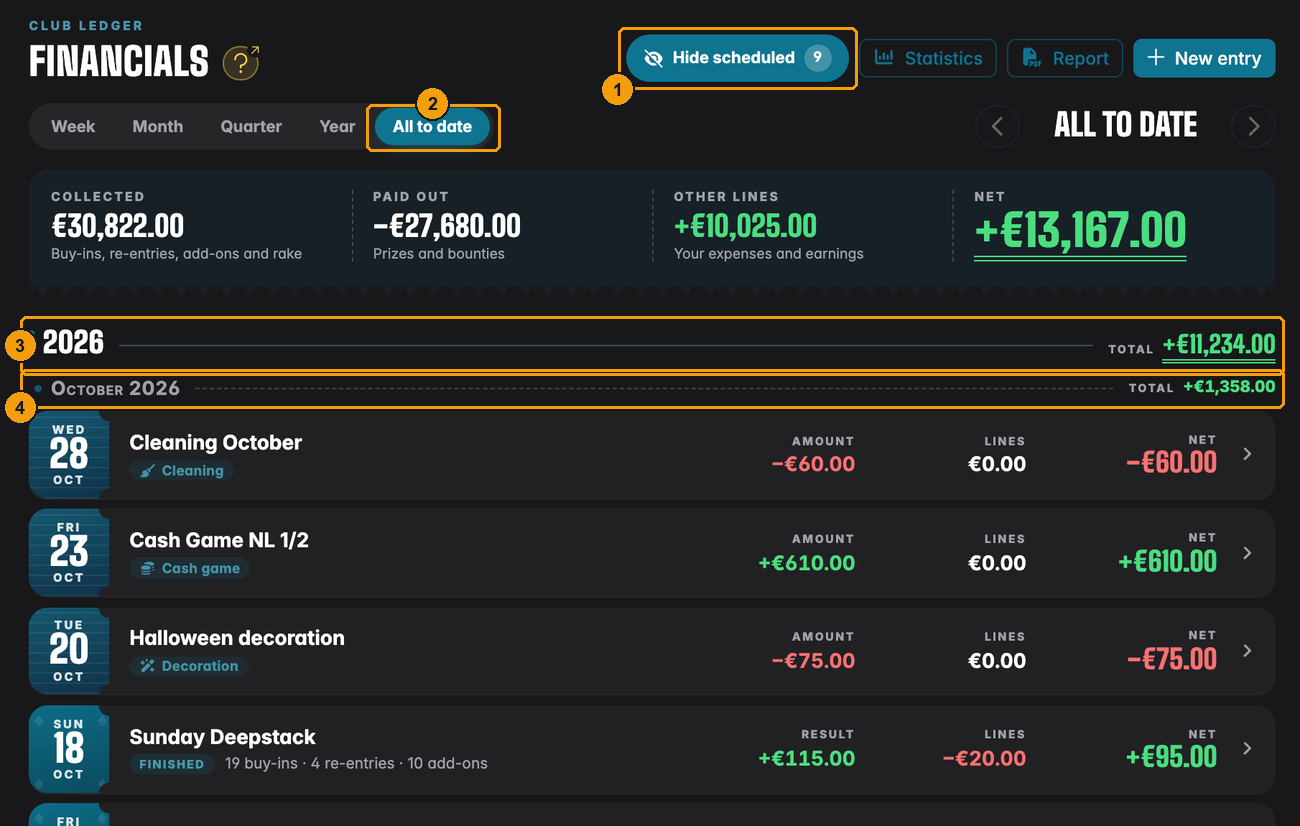
- Hide scheduled is switched on (it's filled in). The number shows nine scheduled tournaments are hidden.
- All to date shows everything since the first entry.
- In All to date the list is split by year first...
- ...and by month inside each year, each with its own total.
The page remembers your choices in the web address, so you can bookmark "this month, scheduled hidden" and land there directly.
What a tournament books
You don't have to type anything for a club tournament. When it finishes, UHT reads the tournament and books its figures. Open one from the list to see them. Here is the Monthly Main Event from September:
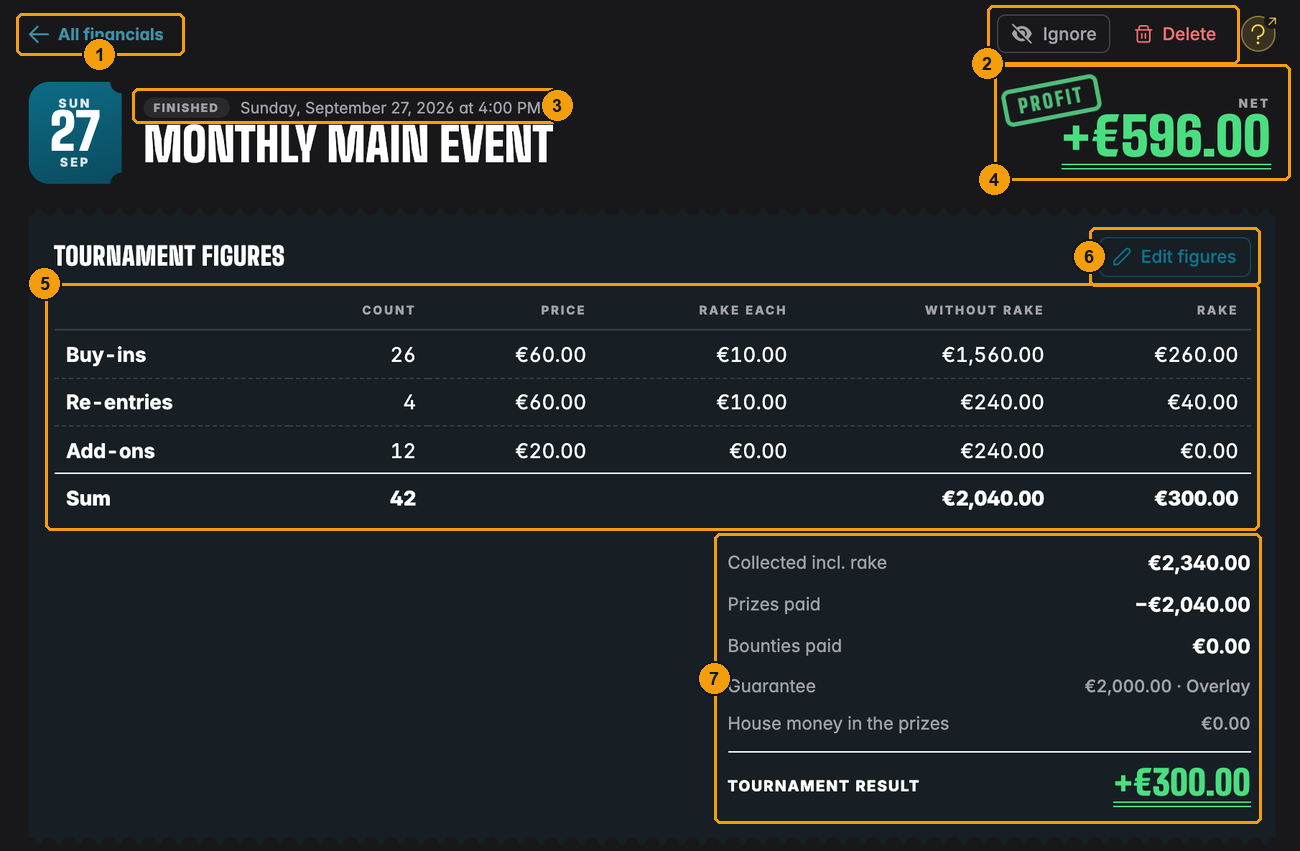
- All financials takes you back to the list, to the same period and page.
- Ignore and Delete for the whole entry (see Ignoring and deleting).
- The status and the date and time the tournament started.
- Net for the whole entry, with a stamp: Profit, Loss or Even.
- Tournament figures. One row each for Buy-ins, Re-entries (or Rebuys,
depending on how the tournament was set up) and Add-ons:
- Count: how many there were.
- Price: the price that goes to the players, without rake.
- Rake each: the fee you charged on top. See Collecting rake.
- Without rake: Count × Price. This is the money that belongs to the players.
- Rake: Count × Rake each. This is the money the house keeps.
- Edit figures lets you correct the numbers by hand.
- The summary:
- Collected incl. rake: everything players handed over.
- Prizes paid: the prize money paid out.
- Bounties paid: bounty money paid out at knockouts.
- Guarantee and House money in the prizes: only shown for a tournament with a guaranteed prize pool (more below).
- Tournament result: Collected minus prizes minus bounties.
The Main Event had 26 buy-ins and 4 re-entries at €60 + €10, and 12 add-ons at €20. Players paid €2,340. The prize pool was €2,040, all of which went back to the players. What's left is the €300 rake. That €300 is the Tournament result.
For a normal tournament, the tournament result is your rake. The rest of the money belongs to the players and goes back to them. Bounties look different on the page but work the same way. Guarantees and freerolls are where the club's own money comes in.
Bounties. In a bounty tournament part of every buy-in is bounty money. It's included in the price and paid back to players at knockouts, so it shows up under Bounties paid. It doesn't change the result.
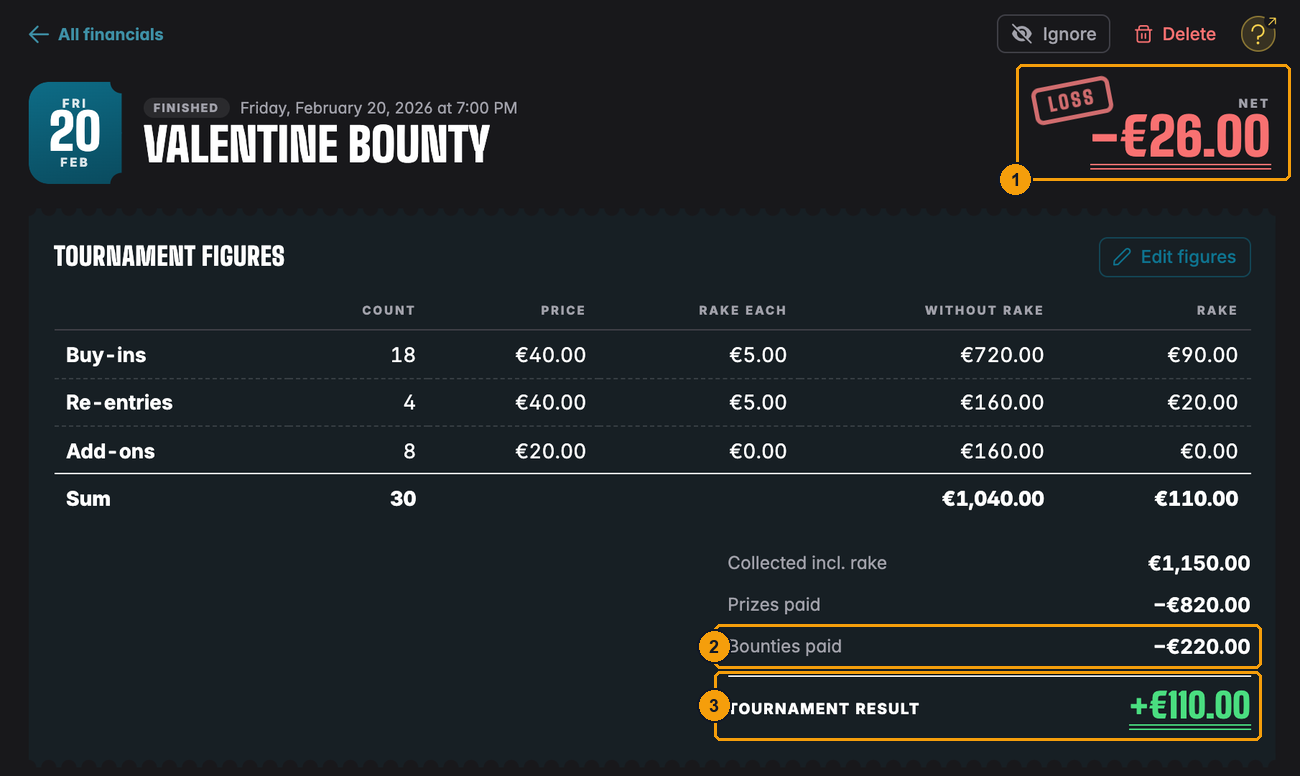
- The Valentine Bounty ended the night with a Loss of €26...
- ...even though the €220 of bounties went back to the players as they should...
- ...and the tournament itself left a result of €110 (its rake). The loss came from the dealer, the food, the decoration and the flyers that were added to this night as lines.
Guarantees. If you promised a guaranteed prize pool and fewer players came than needed, the club pays the difference. That top-up is called overlay. The Guarantee row shows the promised amount, and House money in the prizes shows how much the club had to add. That money is part of Prizes paid, so it comes straight off your result. A Main Event with a €2,000 guarantee that only collects €1,700 for the pool leaves the club €300 short before the rake. If the guarantee is set to be added on top of the pool instead, the row says Added on top.
Freerolls. A freeroll has no buy-in, so there's nothing to collect. Whatever prizes you hand out are a cost to the club.
Only club tournaments: tournaments scheduled for the club, as described in Club tournaments. A tournament you run on your own account without the club doesn't appear in the club's books.
Correcting the figures
Sometimes the timer doesn't match the cash box. Someone paid an add-on in cash and nobody pressed the button, or a re-entry was entered twice. Click Edit figures:
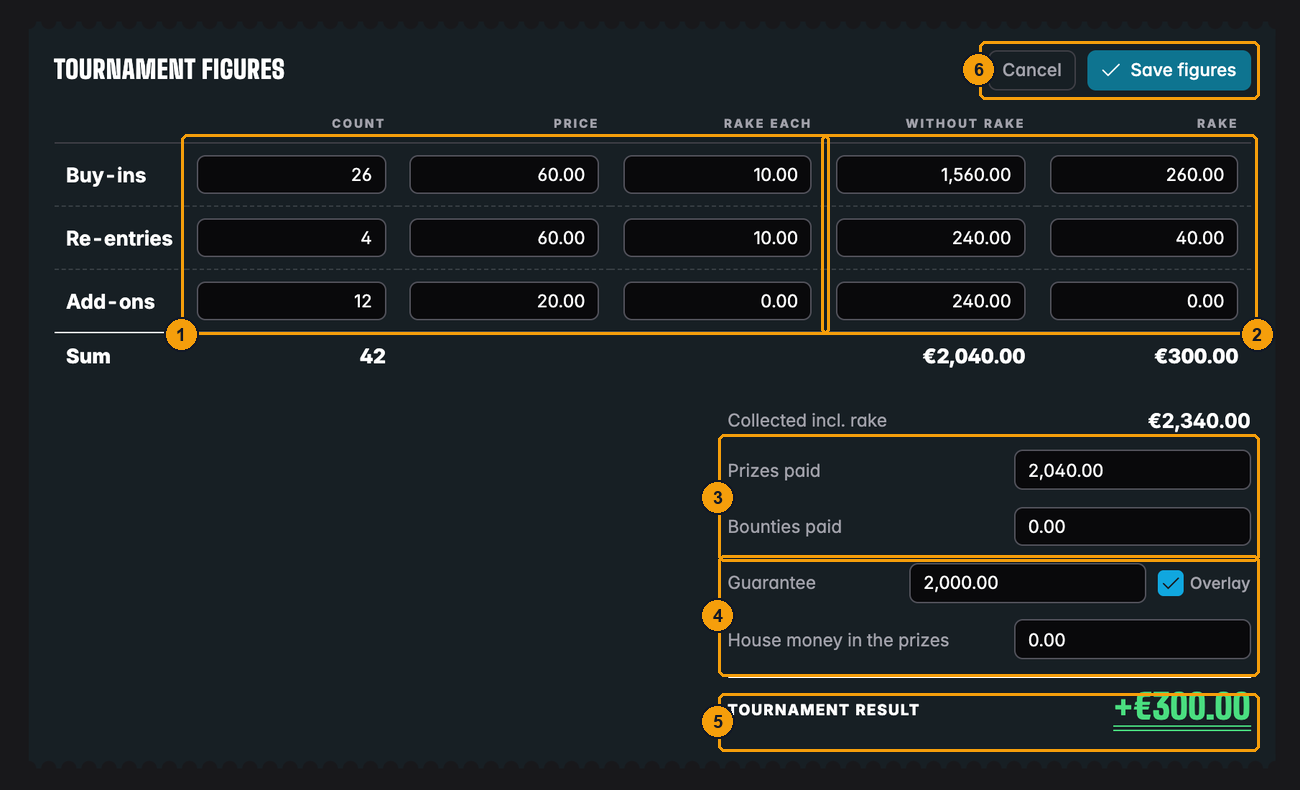
- Change Count, Price or Rake each. The two totals on the right recalculate as you type.
- You can also overwrite Without rake and Rake directly, for example when one player got a discount.
- Prizes paid and Bounties paid, if the payout was different from the plan.
- Guarantee, the Overlay tick and House money in the prizes are there so the entry tells the full story. The result is worked out from what was collected and what was paid out, so a top-up from the club belongs in Prizes paid.
- Tournament result updates live while you type.
- Save figures keeps your changes, Cancel throws them away.
Once saved, the section shows Edited by hand. UHT then stops updating these figures from the tournament, so your correction stays. If you change your mind, Restore from tournament puts the original figures back after asking you to confirm.
Edit figures only appears once a tournament has finished. Until then, the page tells you the figures are on their way:
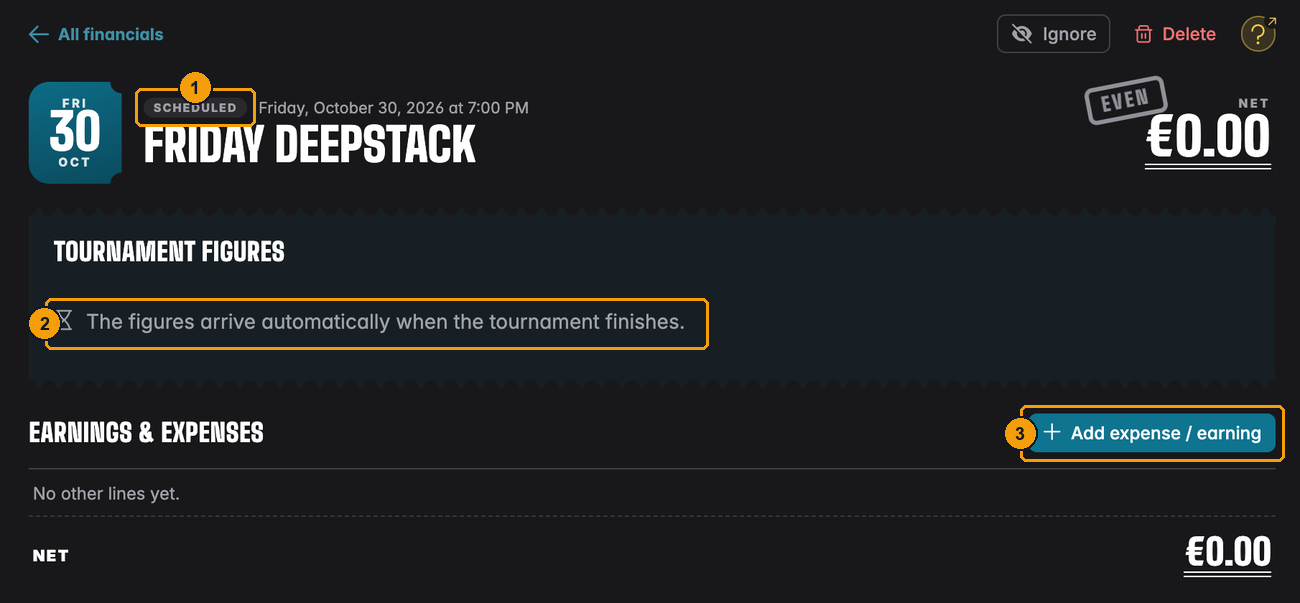
- Scheduled: the tournament hasn't been played yet.
- Figures will appear here on their own.
- You can already add expenses, for example the dealer you've already booked.
Expenses and earnings on a tournament
The tournament result is only part of the story. That Main Event also needed dealers, food and a door person, and the bar sold drinks. Those go into Earnings & expenses further down the same page:
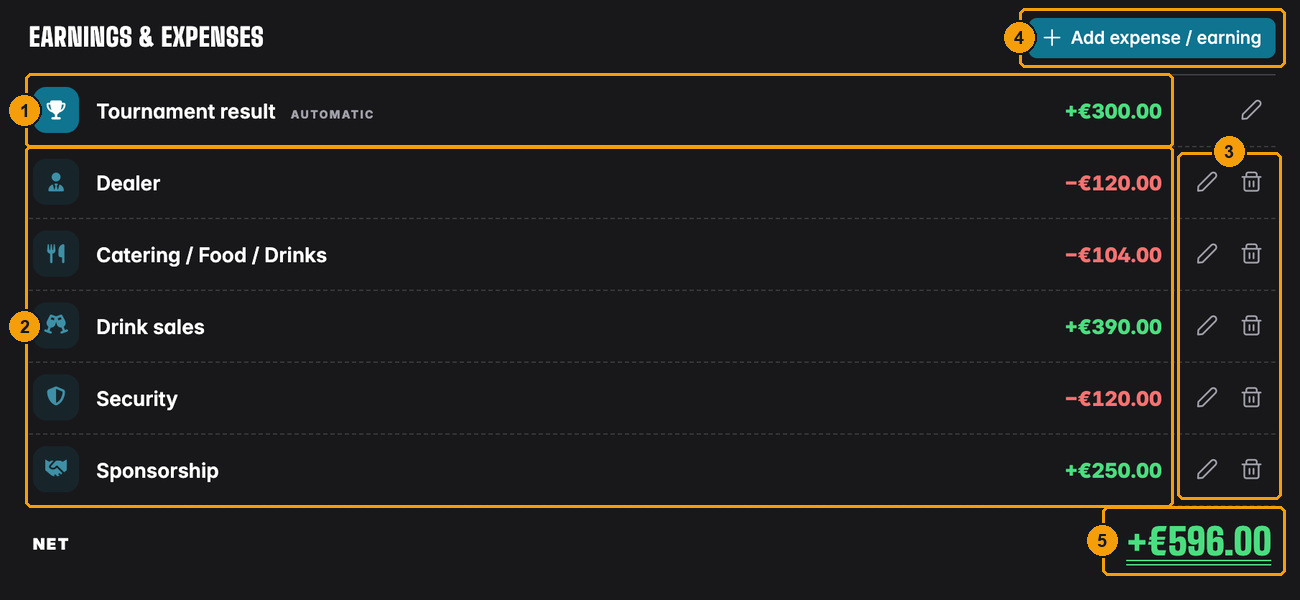
- Tournament result, marked Automatic. It always matches the figures above. The pencil opens Edit figures. You can't delete this line.
- Lines you added: Dealer −€120, Catering / Food / Drinks −€104, Drink sales +€390, Security −€120 and Sponsorship +€250.
- The pencil edits a line, the bin deletes it (after asking).
- Add expense / earning adds a new line.
- Net of the whole night: €300 + €390 + €250 − €120 − €104 − €120 = +€596.
So the answer to "How did the September Main Event do after dealers and food?" is right on this page: +€596. The rake alone was €300. Drinks and the sponsor made it a good night.
Harbor Lights booked the extra door staff for the Main Event as a separate entry ("Door staff, Main Event", −€90). That's not wrong, the year total is the same either way. But the Main Event's own page now says +€596, when the real answer is +€506. If an expense belongs to one tournament, add it as a line on that tournament.
Adding a line
Click Add expense / earning:
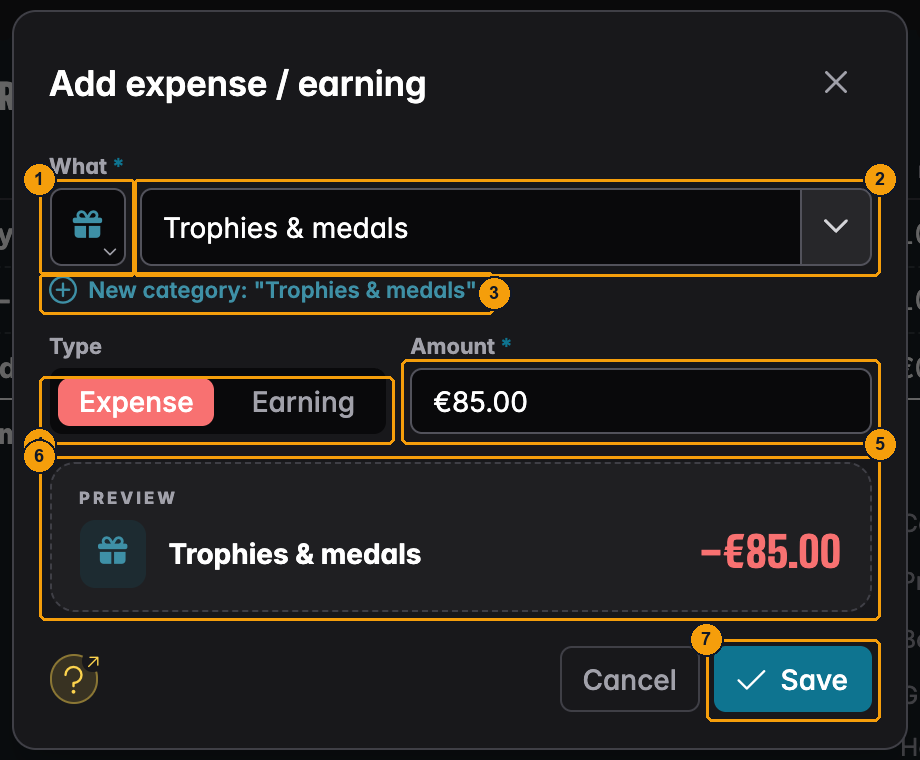
- The icon. You can pick it for your own types (see below). Built-in types bring their own.
- What: start typing, or open the list with the arrow on the right.
- If you type a name that doesn't exist yet, UHT tells you it creates a New category.
- Type: Expense or Earning. Expense is selected when the window opens. If you type a minus amount, it switches to Expense by itself.
- Amount, always as a positive number. The type decides the sign.
- Preview shows how the line will look, in red for an expense and green for an earning.
- Save adds the line. The entry's net updates straight away.
Built-in types and your own
The list starts with seven built-in types, each with a fixed icon and colour:
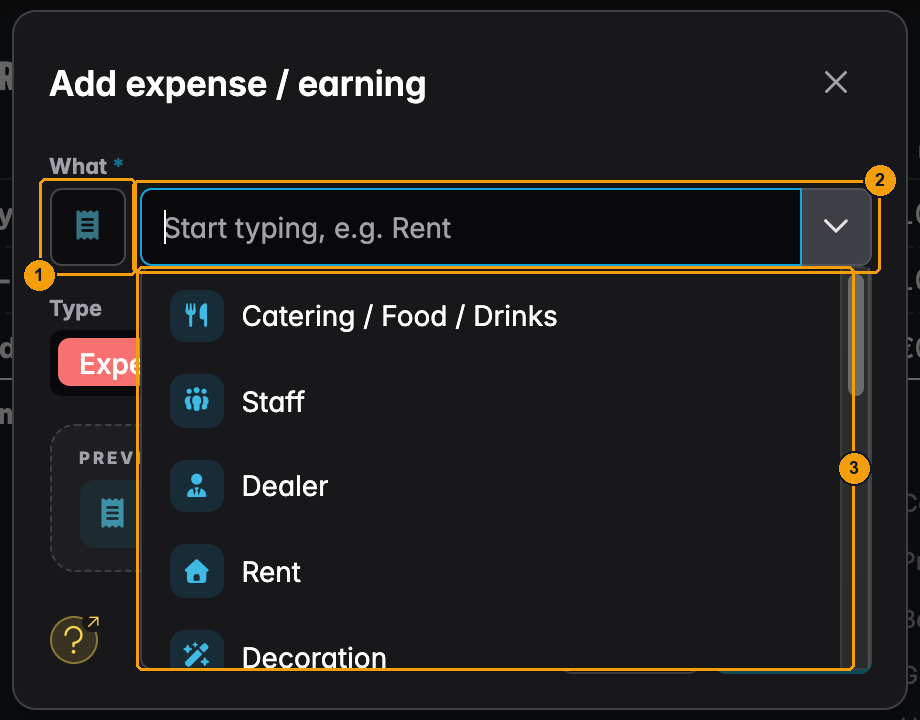
- The icon of the chosen type.
- Type here to search, or use the arrow to open the list.
- The built-in types: Catering / Food / Drinks, Staff, Dealer, Rent, Decoration, Services and Security.
Anything else, you name yourself: "Cash game", "Drink sales", "Membership fees", "Sponsorship", "Equipment", "Flyers & posters". Once a name has been used, it appears further down the same list, marked used before, with the icon you gave it:
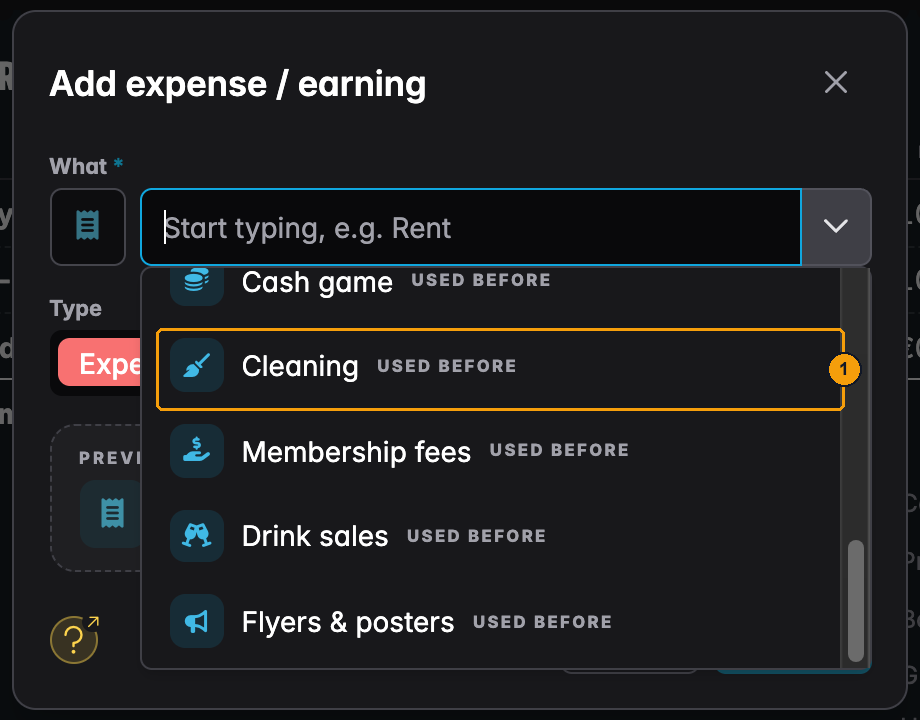
- One of the club's own types. Picking it from the list keeps the spelling consistent, so "Drink sales" doesn't turn into "drinks sale" next month and split your report in two.
To create a new type, type its name, then click the icon square to choose one of 20 icons:
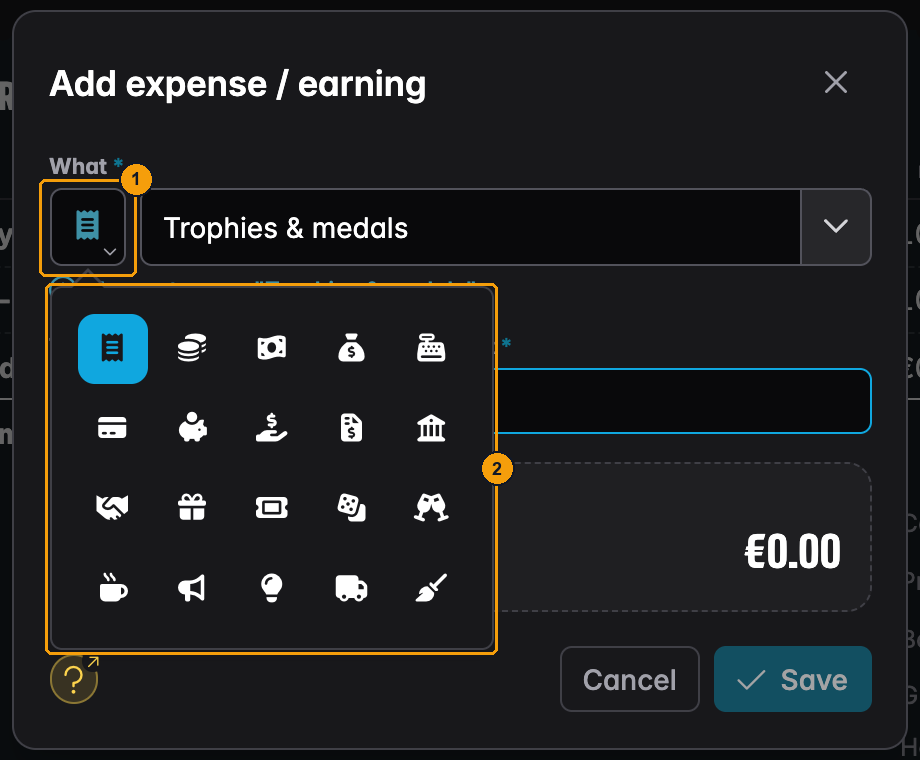
- The icon button (only clickable for your own types).
- Pick an icon that tells the type apart at a glance in the ledger and in the report.
Types are what the statistics and the report group by. Think about the questions you'll ask later: "How much do we spend on dealers?", "Do drink sales cover the food?". Keep one type per question. "Pizza" and "Snacks" as separate types are fine if you want to compare them. If you don't, book both as Catering / Food / Drinks.
To change a line later, click its pencil. The same window opens with the title Edit line. The bin removes the line after Delete this line?.
Booking things by hand
Not everything the club earns or spends belongs to a tournament: rent, membership fees, a cash game, a new set of chips, the Christmas party. Book these with New entry at the top of the ledger:
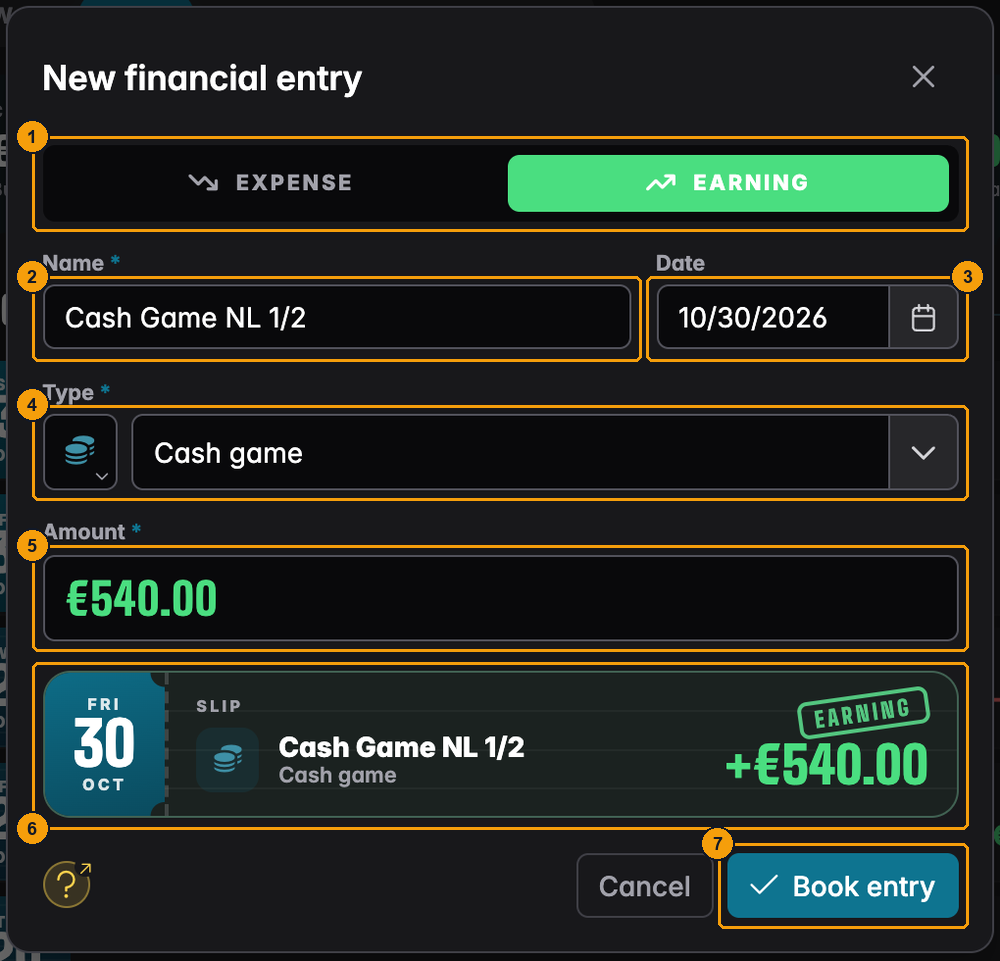
- Expense or Earning. Choose first, the whole slip changes colour.
- Name: what you'll see in the list, e.g. "Cash Game NL 1/2" or "Hall rent November".
- Date: the day it happened. It decides which week, month and year the entry counts in.
- Type: the same list as for lines, built-in types plus your own.
- Amount.
- The Slip shows the finished entry before you book it.
- Book entry saves it. You'll see Entry booked and the entry appears in the list.
A booked entry has its own page, a little simpler than a tournament's:
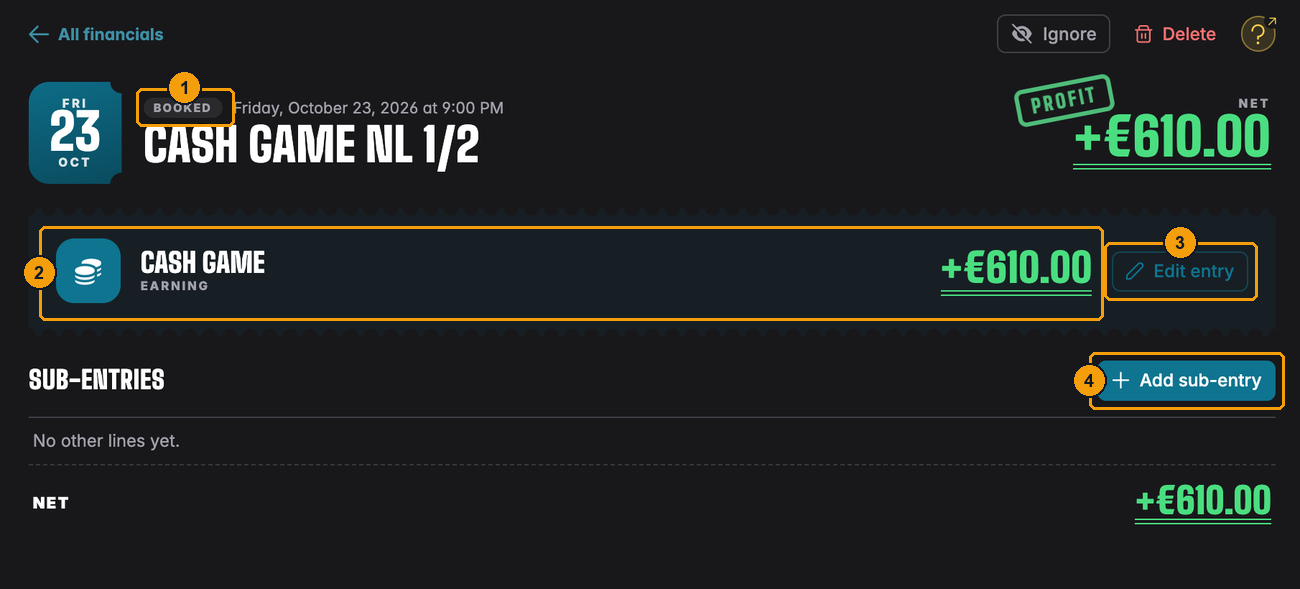
- Booked marks an entry you added yourself.
- Its type and amount.
- Edit entry opens the same window again to change name, date, type or amount.
- Add sub-entry adds lines to it, just like on a tournament.
Sub-entries are handy when one thing has several parts. A cash game earned the club €610 from the rake, but the dealer cost €80: book the cash game as an earning of €610, then add a sub-entry "Dealer", expense €80. The entry's net is €530, and your dealer costs still show up under Dealer in the statistics.
Rent, fees and other monthly items
UHT doesn't repeat entries on its own. Book rent, membership fees or cleaning once a month, when you pay or receive them. That takes a few seconds, because the type remembers its icon and the list suggests it. A clear naming pattern ("Hall rent October", "Hall rent November") keeps the list easy to scan.
Ignoring and deleting
Both buttons sit at the top right of every entry.
Ignore keeps an entry in the list but leaves it out of every total, the statistics and the reports:

- Ignore confirms. The entry gets an Ignored tag in the list, and its page says Ignored — left out of all totals, statistics and reports.
Use it for things that shouldn't count but that you don't want to lose: a test tournament, a charity night where all the money went to the charity, a private event in your room. To count it again, open it and click Include again.
Delete removes an entry for good:
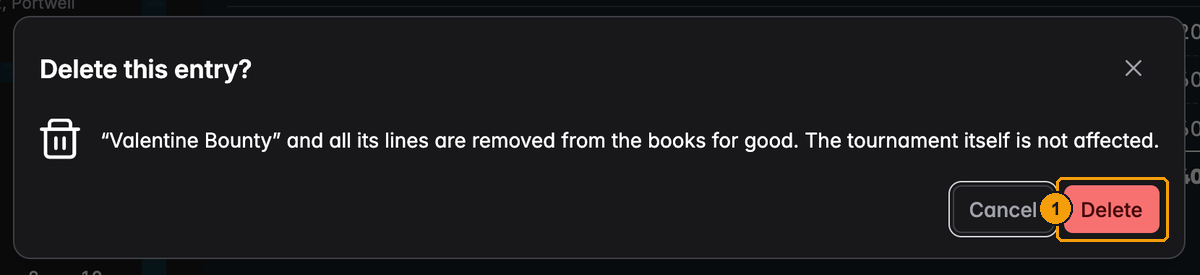
- Delete confirms.
- A booked entry is deleted with all its sub-entries.
- A tournament entry is removed from the books with all its lines. The tournament itself (results, standings, league points) is not touched, and the entry won't come back when the tournament changes later.
If you're not sure, choose Ignore. You can undo it at any time.
Good to know
Money in other currencies. Entries are added up as they are. If a tournament was set up in a different currency from your account (say SEK instead of EUR), its row gets a small globe badge with the currency, and a note under the totals says how many entries that affects. Open the entry and click Convert to EUR (or your currency): UHT suggests the current exchange rate, you can change it, and every amount of that entry is converted. Later updates from the tournament use the same rate.
Locked clubs. When a club has more members than its license allows, it's locked and you can't book or change anything until that's sorted out. The buttons stay visible but greyed out. See Locked clubs.
Tournament names and dates come from the tournament. If you rename or move a scheduled club tournament, the entry follows.
Questions
Why don't I see the Financials tab? Only directors see it. Ask a director to change your role (see Changing a role).
I'm a director and I see "Example data". Do I need to buy a license? No, the club owner does. Financials follow the owner's Commercial license and unlock for all directors at once.
A tournament is missing from the books. Check that it was scheduled as a club tournament. Also check the period (a tournament on 31 October is not in November) and whether Hide scheduled is on. Tournaments that haven't finished count as scheduled or live.
The prize money in the books is wrong. Open the entry, click Edit figures, fix the numbers and click Save figures. They are marked Edited by hand and won't be overwritten.
Can I add an expense before the tournament is played? Yes. Open the scheduled tournament in the ledger and use Add expense / earning. The figures arrive on their own when the tournament finishes.
Is the Tournament result the same as my profit? No. The tournament result is what the tournament itself left: mostly your rake, minus any money the club added to a guarantee. Your profit for the night is the Net, after the dealer, the food and everything else you added.
Do players see any of this? No. Financials are visible to directors only.
How do I see a whole year at once, or print it? Use Statistics for charts and Report for a PDF. Both are explained in Financial statistics & reports.